

Introduction
When you finish building a client’s website, there’s usually one more challenge left: making sure they know how to use it. Even with a well-designed site, clients eventually have questions about updating content, replacing images, or editing specific sections. Some of those questions are about Divi itself, while others are about the way you built their website.
That’s exactly why we created the exclusive Help Videos & Written Guides feature in our new Divi Builder Experience Helper plugin. Now you can remove the confusing built-in Knowledge Base (which now links externally to the Divi help center) and instead add your own videos and written documentation directly into the Divi Builder, giving clients personalized training exactly where they’re already working. This is ideal for handing a site off to a business owner or training an in-house marketing team, making your own internal website documentation available where they actually need it.
▶️ Please watch the video above to get all the exciting details! 👆
Replace Divi’s Knowledge Base With Your Own Resources
Divi 5 includes a Knowledge Base tab inside the Builder Helper that links users to Elegant Themes’ online documentation. This can be confusing because it takes people away from the site and into a large documentation library that can easily overwhelm someone who just wants to update their homepage or replace an image. While those guides are a useful resource for learning Divi itself, they don’t teach someone how to edit the website you’ve built for them.
The Divi Builder Experience Helper plugin gives you the option to hide the default Knowledge Base entirely and replace it with resources that are specific to your own workflow. If your goal is to create a simplified editing experience for clients, this helps keep them focused on instructions that are actually relevant to their site instead of sending them to external documentation.

Whether you’re handing a site over to a client or training a content editor on your team, having documentation that’s intentional and personalized to the project creates a much better experience. It also pairs perfectly with the plugin’s other client-focused features. For example, if you’ve simplified the Divi Builder by hiding advanced settings or limiting editing controls, your custom training materials can explain everything based on exactly what’s visible to them and how your clients should use it.

Add Custom Videos And Written Guides In Divi 5
Use the Custom Help Videos & Written Guides feature in our Divi Builder Experience Helper to personalize the Divi 5 experience.
Create Your Own Video Library Inside Divi
One of the easiest ways to train clients is by recording short videos that demonstrate common editing tasks. Instead of storing those videos in emails, shared documents, or a knowledge base somewhere else, you can place them directly inside the Divi Builder.
Record Your Videos
If you are an agency or freelancer building sites for clients, or a team leader managing website designers, SEO specialists, copywriters, etc inside WordPress, this is the perfect opportunity to spend some time creating short videos for each situation or user role.
We recommend recording videos in a way that can be reused across multiple client sites whenever possible. That way you only have to create the video once, upload it to YouTube as an unlisted video, and then reuse it in future projects.
Adding Your Videos Into The Divi Builder
After recording your videos and uploading them to YouTube, open the workspace settings and go to the Help Videos & Written Guides tab. From there, enable Show Custom Help Videos.

You can customize the tab name and add as many videos as you’d like. Each video simply needs a few pieces of information:
- A custom title
- A YouTube video URL
- An optional associated Divi module

From there, it becomes part of your custom training library that’s available whenever someone opens the Builder.
This works especially well for the kinds of questions agencies answer repeatedly. You might create a short video explaining how to update the homepage banner, replace staff photos, edit pricing tables, publish a new blog post, or make seasonal changes throughout the site. Instead of writing another email or scheduling another support call, the answer is already waiting inside the builder.
Associate Videos With Specific Modules
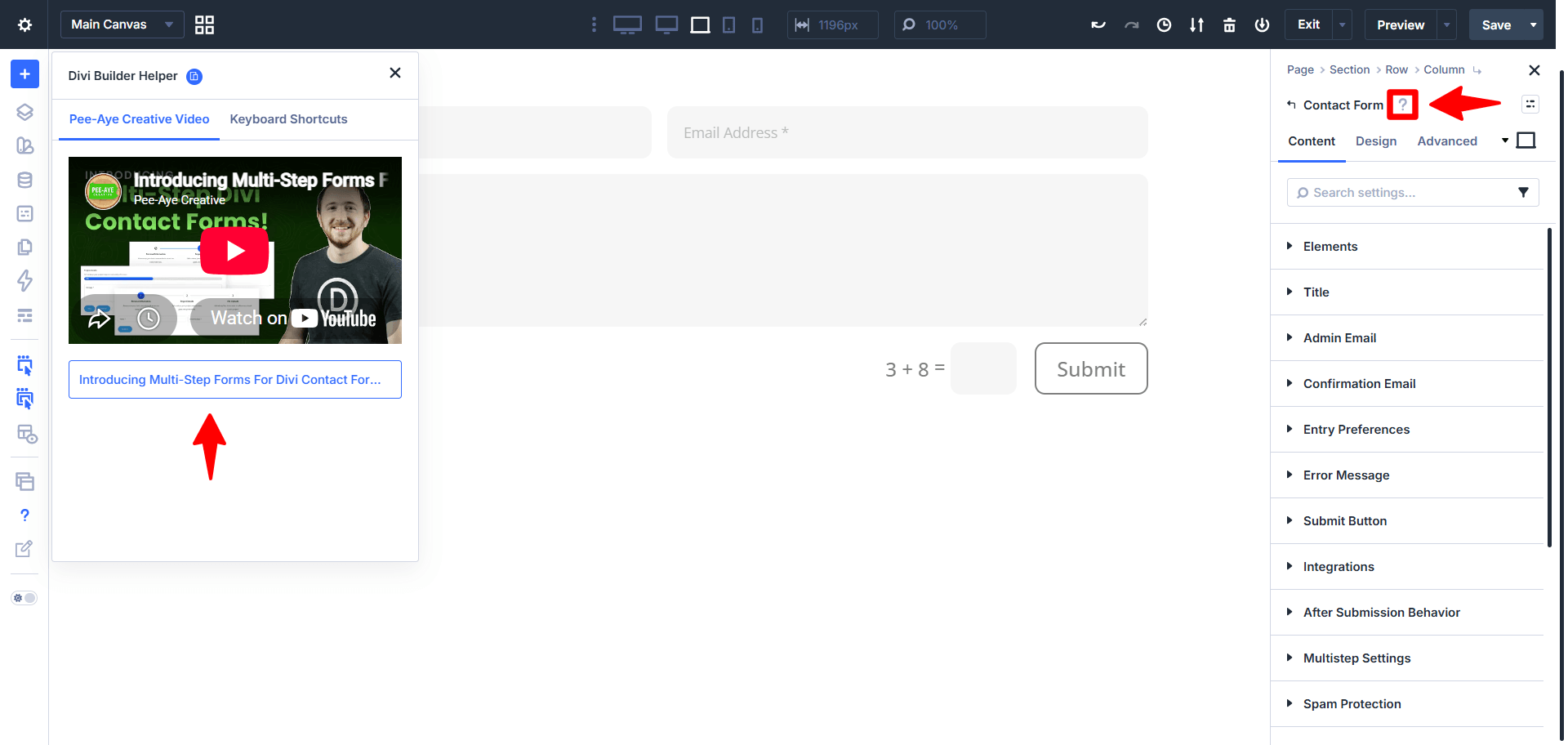
One feature that makes this even more useful is the ability to associate a video with a specific Divi module. While adding a video, simply choose the appropriate module from the optional Associated Module dropdown. When someone later opens that module’s settings, the plugin can display the Help button with only the videos and guides that apply to the component they’re editing.
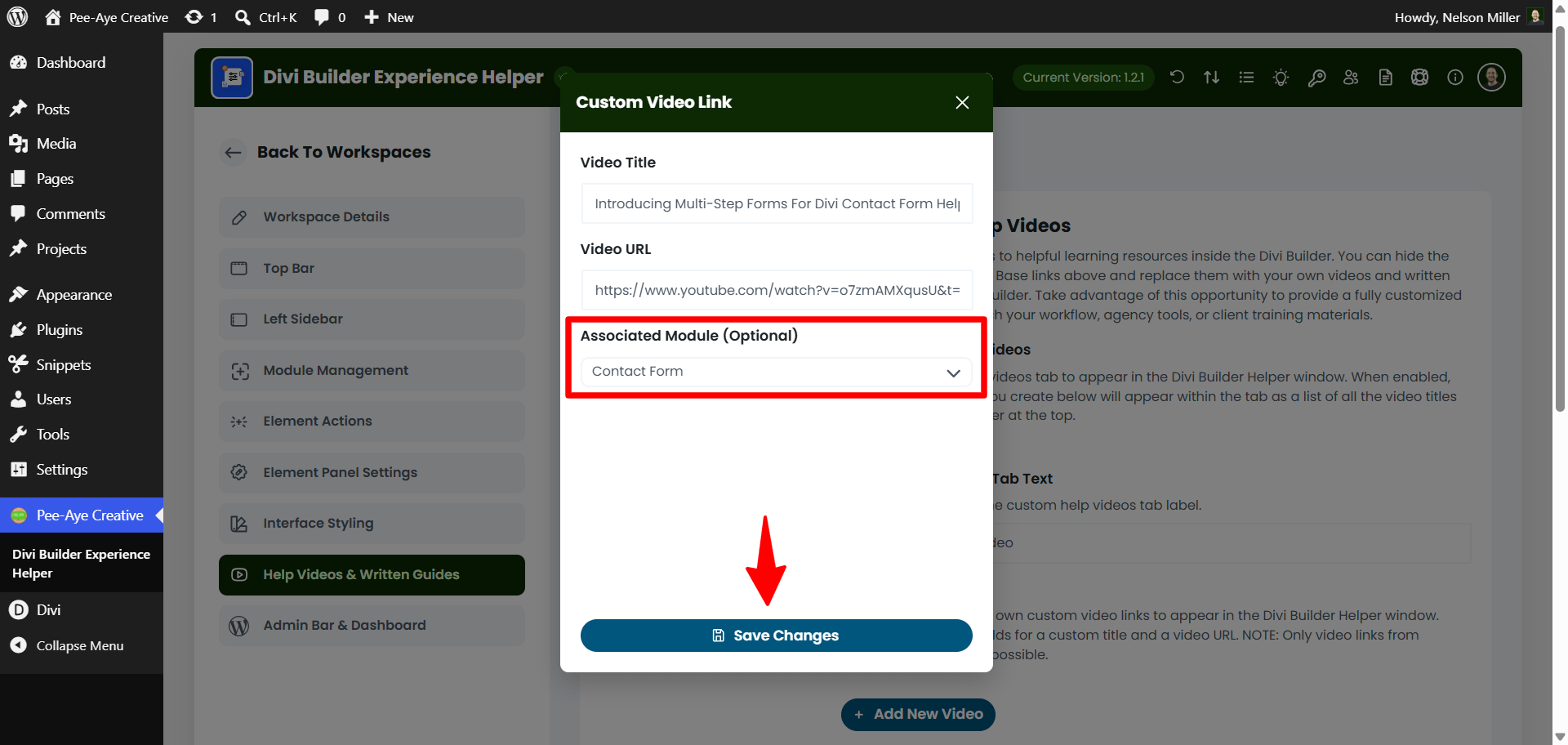
Rather than asking users to search through a long list of tutorials, you’re giving them exactly the information they need at the moment they need it.
Show Different Videos For Each User Or Role
A really special thing about Divi Builder Experience Helper is the ability to customize Divi Builder workspaces for each user or user role. So along with showing or hiding features, simplifying the builder, or even light theming and branding, you can also show different videos and written guides for each user or user role.
To do so, simply set up a different workspace in the plugin’s main settings area. For example, in the screenshot below, we are showing multiple workspaces assigned to specific user roles or individual users.

Inside each workspace, you can add videos you want to show only to specific teams or people. When those users open the Divi Builder, they will have access to the videos assigned to their workspace.
Be sure to check out our tutorials on Configuring Workspaces and Assigning Workspaces To Users & Roles to learn more about setting up personalized editing experiences.
Create Custom Written Guides
Videos are a fantastic way to demonstrate a process, but they aren’t always the best tool for every situation. Sometimes a client just needs a quick reminder about image dimensions, formatting requirements, or which settings they’re allowed to edit. In those cases, a written guide is often faster than watching a video from beginning to end.
That’s why Divi Builder Experience Helper also includes Custom Written Guides, another exclusive feature that lets you create your own documentation directly inside the Divi Builder.
Create Your Written Guides
Creating a guide is just as straightforward as adding a video. Give it a title, write your content using the built-in rich text editor, and save it to the current workspace.

Unlike a simple text note, the editor supports rich formatting, allowing you to create documentation that’s actually enjoyable to read. Add headings, lists, links, images, and other formatting to organize your instructions however you’d like.
Because there are no limits on the number of guides you can create, it’s easy to build a complete library of documentation over time. Some guides might explain how to edit a particular page, while others can document your agency’s content standards or SEO requirements.
Associate Guides With Specific Modules
Just like videos, written guides can also be associated with individual Divi modules. This means users don’t have to browse through a collection of documentation looking for the right article. When they open a module, they can immediately access the guide that’s relevant to the task they’re working on.

We’ve found this especially useful for documenting custom layouts and client-specific workflows where a few written reminders can prevent accidental changes or unnecessary support requests.
Show Different Videos For Each User Or Role
A really special thing about Divi Builder Experience Helper is the ability to customize Divi Builder workspaces for each user or user role. So along with showing or hiding features, simplifying the builder, or even light theming and branding, you can also show different videos and written guides for each user or user role.
To do so, simply set up a different workspace in the plugin’s main settings area. For example, in the screenshot below, we are showing multiple workspaces assigned to specific user roles or individual users.

When To Use Videos Or Written Guides
One of the nicest things about this feature is that you don’t have to choose one or the other. Videos and written guides complement each other extremely well.
Videos are usually the better choice when you want to demonstrate a workflow or walk someone through a series of steps. Written guides work better as reference material that someone can quickly scan while they’re editing.
For example, written guides are perfect for documenting things like:
- Brand and style guidelines
- Image dimensions and optimization tips
- SEO requirements for new pages or blog posts
- Instructions for editing custom layouts
- Notes about which settings should remain unchanged
Using both together gives clients multiple ways to learn, making it much easier for them to manage their website confidently.
Build A Better Website Handoff
One of the goals behind Divi Builder Experience Helper has always been to make Divi 5 feel less overwhelming for the people who use it every day. Sometimes that means hiding advanced settings, simplifying the interface, or limiting editing controls. Other times it means providing better guidance so users feel confident making changes on their own.
The goal isn’t simply to give clients more documentation. It’s to make the entire editing experience easier. Combined with Workspaces, interface simplification, editing restrictions, and the other customization features in Divi Builder Experience Helper, custom videos and written guides help transform Divi into an editing environment that’s personalized to each client instead of expecting every client to adapt to Divi 5.

Learn More About Divi Builder Experience Helper
Customize and control the Divi Builder UI/UX with the Divi Builder Experience Plugin by showing or hiding interface elements, choosing default preferences, enabling or disabling features and options, and personalizing styles and text, all within configurable, reusable workspaces that can be assigned to any user or role, imported and exported between sites, and used to create a faster, simpler, and personalized Divi editing environment.
- Simplify The Divi 5 Builder For Clients And Non-Technical Users
- Personalize The Divi 5 Builder To Match Your Own Workflow
- Hide Any Module, Option, Setting, Or UI Element In The Divi 5 Builder
- Customize The Divi 5 Builder Interface For Specific Users And Roles
- Add Your Own Custom Help Videos And Written Guides Inside The Divi 5 Builder
- Customize The Divi 5 Builder Interface Colors And Styling
- Save, Export, And Reuse Your Favorite Divi 5 Builder Configurations
- Control Access To Modules, Settings, And Builder Features By User Or Role
This plugin is evolving rapidly, so let us know which feature to add next!






0 Comments