

Divi Carousel Maker Plugin by Pee Aye Creative

Divi Carousel Maker

Turns any Divi modules, rows, or sections into fully customizable carousels directly in the builder without needing separate modules or recreating layouts from scratch. Includes extensive controls for layout, slide spacing, scrolling behavior, navigation, autoplay, animation, design, and responsive settings, making it possible to create unique carousel layouts from existing content in the builder.

From: $29.00 / year

(31 customer reviews)
Nelson Miller Profile Blue

Hello, I’m Nelson Miller, the owner of this company and creator of this Divi plugin. I enjoy making tools that help you succeed, and I hope you like it! If you have any questions, just send us a message!

Make A Carousel With Any Divi Module!

No need to keep buying custom 3rd party carousel modules for every single use case! Just make a carousel of modules directly in the Divi Builder! One size fits all!

Over 120 Carousel Settings And Counting!!!
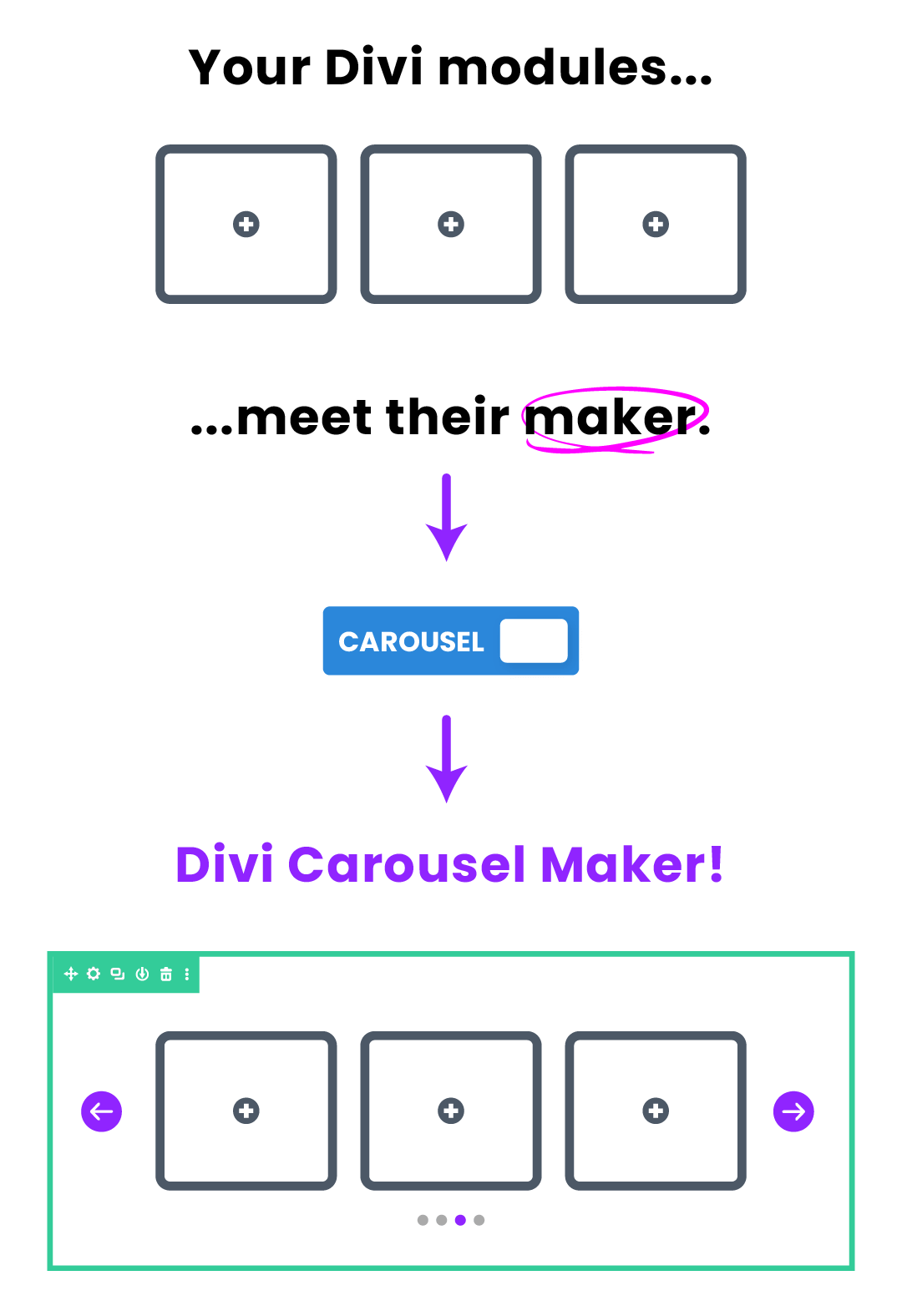
Divi Carousel Maker infographic

How It Works

When the Divi Carousel Maker plugin is installed and active, additional settings to create and design a carousel will appear in all the Divi column settings in the Divi Builder. Any modules that you add into the column will be arranged into a carousel when you exit the builder!

How It Works

When the Divi Carousel Maker plugin is installed and active, additional settings to create and design a carousel will appear in all the Divi column settings in the Divi Builder. Any modules that you add into the column will be arranged into a carousel when you exit the builder!

enable the carousel toggle in the Divi Carousel Maker plugin
Divi Carousel Maker How It Works
Divi Carousel Maker Free Demo Layout Downloads

113 Free Carousel Layouts!

We are excited to announce that the demos for the Divi Carousel Maker plugin are now available as free layouts for you to download and import into your own site. These layouts are already created on our carousel demo website using the settings and features in the plugin. We spent a lot of time making these, and hope that you enjoy them! Hopefully these layouts will allow you to save time while also giving you a chance to explore how each section was created and which settings are used in the carousel and modules.
Divi Carousel Maker General Settings 2.0

General Settings

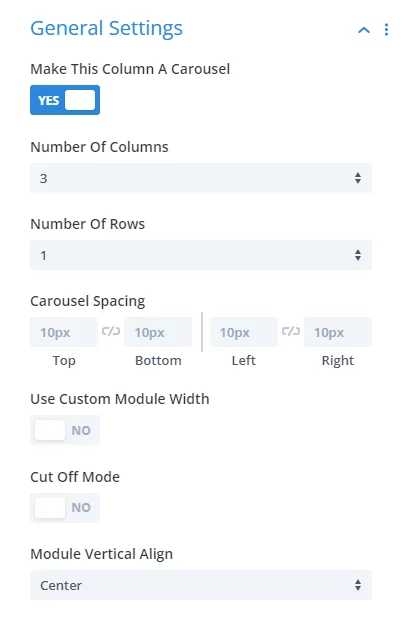
The general settings are where you enable the carousel and configure the basic features, such as the number of columns per device on desktop, tablet, and phone, the number of rows, spacing around the outside of the carousel, setting a custom module width, using the special cut-off mode to show partial slides on each side of the carousel, and the vertical alignment top, center, or bottom.

Scroll Settings

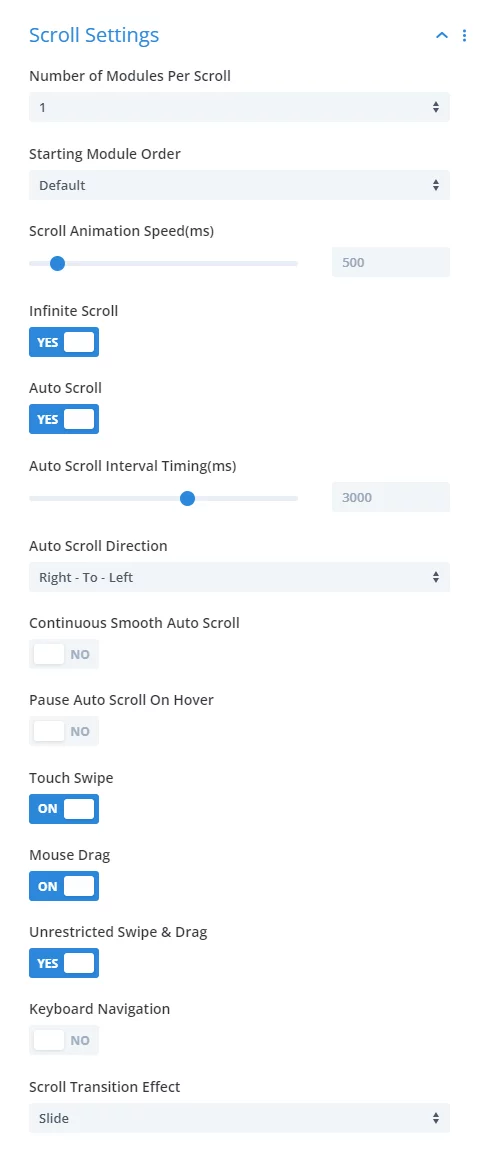
The scroll settings toggle includes all the features about how the carousel moves. This includes how many modules scroll at a time, the order in which the modules are displayed, the animation speed, and whether the carousel should scroll in a loop or stop at each end. It also has many settings related to auto scroll, such as the interval between each auto scroll, which direction it goes, whether it is regular or continuous smooth scroll, and whether it should pause when you hover the mouse over the carousel. There are also options for moving the carousel on touch devices, with the mouse, and navigation with the keyboard arrows. Last but not least, there is a scroll transition affects like slide, fade, coverflow, stack, flip, and cube.

Scroll Settings in the Divi Carousel Maker by Pee Aye Creative 2.0
Divi Carousel Maker Navigation Buttons Settings 2.0

Navigation Button Settings

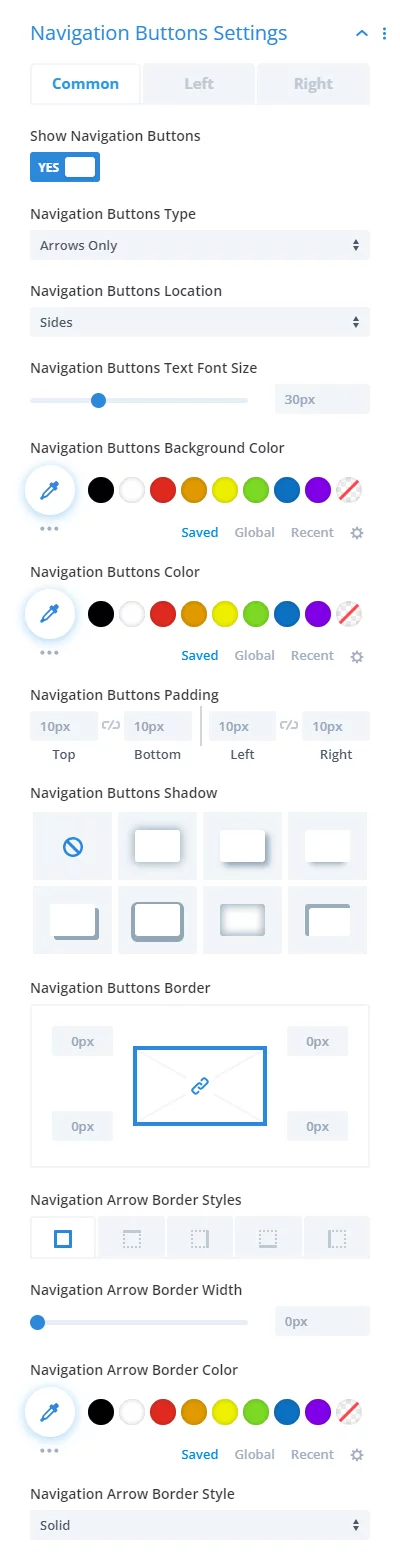
The navigation button settings give you total control over the carousel navigation buttons. Choose the type of button, whether you like just arrow icons, or just text, or both icons and text. Choose the location at the side, bottom, top, and aligned left, center, or right. Everything is customizable, from the background and icon/text color, to the borders, spacing, and box shadows. Each arrow can also be customized independently for total design control and positioning.

Navigation Control Settings

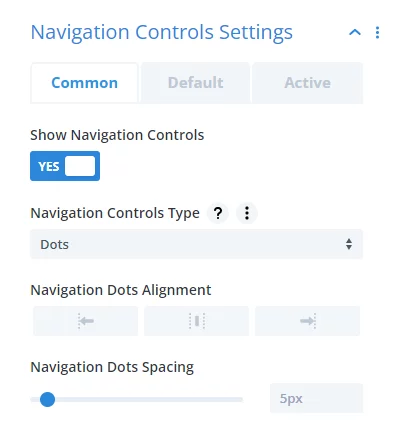
The navigation controls settings are optional, and offer three types to choose from dots, numbers, or images. Each of those three options has their own related settings. You can control the alignment, spacing, width, height, text color, background color, borders, and box shadow of each control, and set different design settings for the active control to highlight it.

Divi Carousel Maker Show Navigation Controls Settings 2.0
Divi Carousel Maker Slide Counter settings total slides

Slide Counter Settings

The slide counter is a way to indicate which slide the user is currently viewing, and also how many total slides there are in the carousel. Each of the numbers and separator can be styled with full design settings.

Design Settings

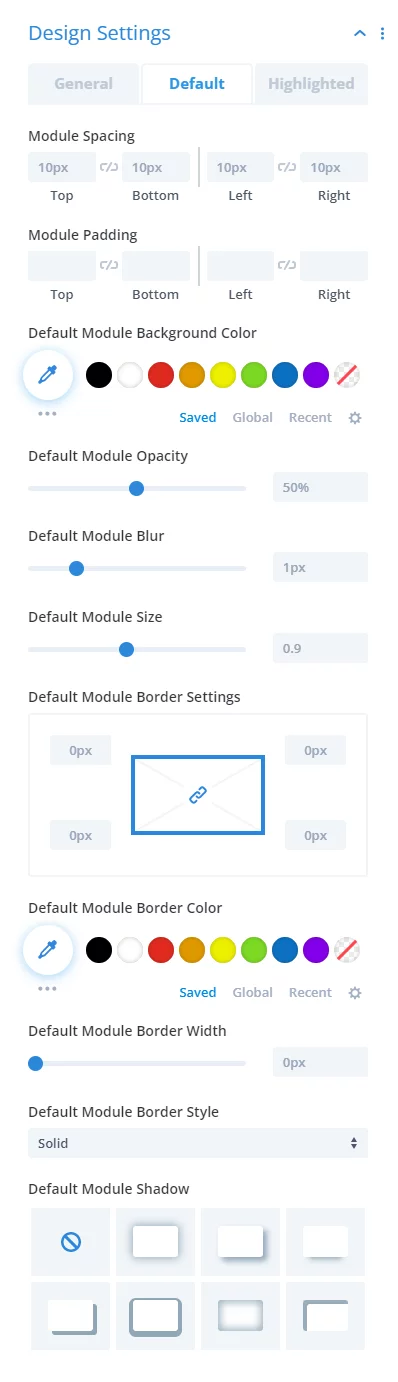
The design settings enable you to customize and style the look of each slide, regardless of what modules are placed inside the carousel. You can choose to highlight the left, center, or right module, and if so, it activates additional settings to style the default and highlighted modules differently to make one stand out from the others. You can adjust all the design settings for each like spacing, background color, opacity, blur, size, borders, and box shadows. There is also a clever setting to equalize the slide heights for modules with different length content to appear the same height.

Divi Carousel Maker plugin Design Settings 2.0
Divi Carousel Maker Hover Settings 2.0

Hover Settings

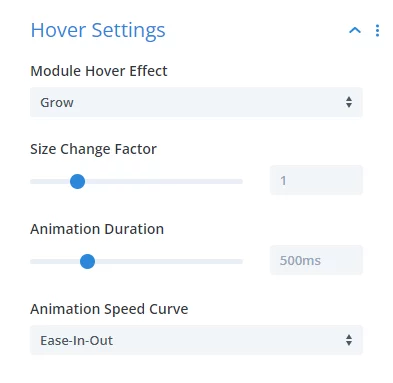
The hover settings provide eleven different hover effects to choose from to provide a nice user experience for your website visitors. These include options for grow, shrink, bounce, pulse, bob, push up, push down, vertical wobble, horizontal wobble, fade, and grayscale. Each of those effects can be customized with settings for the animation duration and other values. These elegant hover effects provide a very nice user experience for website visitors.

Miscellaneous Settings

As the plugin continues to evolve, we will be adding miscellaneous settings here that do not fit into the other categories. This includes a clever feature to group image modules into a gallery in a lightbox, a setting to control the portfolio height to fix a bug in Divi, a feature to scroll to a specific slide, a feature to show a loading animation for the entire carousel and a feature to fix how the person module stacks in a carousel.

Divi Carousel Maker plugin Design Settings 2.0

Includes Settings For Everything!

We have tried to include all the settings and features we could think of for making a carousel!

[object Object]

Clever Integration Directly In Builder

No more buying custom modules for every kind of carousel! In fact, our plugin actually does not include any modules! Instead, we cleverly inject additional settings to create and design a carousel directly in the Divi Builder! So just add anything you want, including standard ad 3rd party modules.

Green adjustment sliders icon on white background.

Design Your Style

The carousel is very functional, but also includes all of the design settings you need. This allows you to adjust things like the navigation arrows and dots, hover effects, spacing, and more. But of course, keep in mind that most of the design of your carousel comes from the modules themselves.

Pee Aye Creative Icons 35

Everything Is Responsive

We have made sure that all of the settings include responsive options, allowing you to change almost everything per device on Desktop, Tablet, and Phone. These thoughtful and helpful settings truly set our plugin apart even more, providing exactly what customers and visitors need!

Green gear icon on light gray background.

Incredible Functionality

We tried to think of every setting needed for a carousel, and then some! We truly do have settings to adjust every part of the carousel, making it easy for users and providing a good user experience for websites visitors. We are committed to adding even more features, so let us know your ideas!

Feature Comparison: Our Plugin vs. Native Divi

See how Divi Carousel Maker compares with the native Divi 5 Group Carousel module, from creating carousels from existing Divi content to controlling slide layout, scrolling, navigation, styling, and interaction.

Carousel Creation & Flexibility

Create carousels from your existing Divi content and use modules, rows, sections, and layouts as carousel slides without changing your normal Divi building workflow.

Feature Ours Divi
Turn Existing Divi Content Into A Carousel
Create A Carousel Directly From Divi Modules
Use Multiple Modules Within Each Slide
Mix Different Divi Modules Within A Carousel
Use Third-Party Divi Modules In A Carousel
Use Divi Rows As Individual Carousel Slides
Use Divi Sections As Individual Carousel Slides
Use Divi Library Layouts As Individual Carousel Slides
Create A Carousel Without A Dedicated Carousel Module
Create A Carousel By Enabling A Setting On An Existing Column
Dedicated Group Carousel Module —
Dedicated Post / Project Carousel Module —

Slide Layout & Responsive Controls

Control the number, size, height, spacing, alignment, and width of carousel slides, with responsive settings for tailoring the carousel across desktop, tablet, and phone.

Feature Ours Divi
Responsive Number Of Slides To Show
Responsive Number Of Slides To Scroll
Custom Slide Width
Variable Slide Width Based On Content
Partially Cut-Off Slides
Custom Slide Height
Adaptive Slide Height Based On Content
Equalize Slide Height
Multiple Carousel Rows
Carousel Slide Vertical Alignment
Slide Content Vertical Alignment
Center Mode

Scrolling & Interaction

Control how the carousel moves and how visitors interact with it, including scrolling behavior, touch and mouse interaction, keyboard navigation, and transition effects.

Feature Ours Divi
Automatic Rotation / Auto Scroll
Custom Auto Scroll Interval
Custom Transition Speed
Infinite Scrolling / Looping
Specific Starting Slide
Random Starting Slide
Custom Scroll Direction
Continuous Smooth Auto Scroll
Pause Auto Scroll On Hover
Pause Auto Scroll When A Video Slide Is Playing
Touch Swipe
Mouse Drag
Unrestricted Swipe & Drag
Keyboard Navigation
Draggable Scrollbar
Multiple Carousel Transition Effects
Fade, Coverflow, Stack, Flip, Cube & Creative Transitions

Navigation

Customize carousel navigation with flexible navigation buttons, dots, numbers, or image controls, including their appearance, position, spacing, and active-state styling.

Feature Ours Divi
Show / Hide Navigation Arrows
Custom Left & Right Arrow Icons
Arrow-Only Navigation
Text-Only Navigation Buttons
Arrows & Text Navigation Buttons
Custom Navigation Button Text
Multiple Navigation Button Positions
Top & Bottom Navigation Button Positions
Independent Left & Right Button Positioning
Custom Horizontal & Vertical Button Positioning
Conditional Navigation Buttons At Carousel Limits
Basic Arrow Styling
Basic Dot Navigation
Dot Navigation Above, Below, Or Overlaid On Slides
Dot Navigation Alignment
Numbers As Navigation Controls
Images / Thumbnails As Navigation Controls
Separate Active Navigation Control Styling
Slide Counter Showing Current & Total Slides

Slide Design & Highlighting

Customize the appearance of carousel slides and create distinct styling for highlighted slides, including slide size, spacing, backgrounds, opacity, blur, borders, and shadows.

Feature Ours Divi
Style All Carousel Slides Separately From Their Content
Style Individual Carousel Slides Independently
Style Active / Highlighted Slide Separately
Choose Left, Center, Or Right Slide To Highlight
Separate Default And Highlighted Slide Backgrounds
Separate Default And Highlighted Slide Opacity
Separate Default And Highlighted Slide Blur
Separate Default And Highlighted Slide Size
Separate Default And Highlighted Slide Spacing
Separate Default And Highlighted Slide Borders & Box Shadows
Dedicated Carousel Slide Hover Effects
Multiple Slide Hover Effect Presets
Custom Hover Effect Duration, Easing & Repeat

Advanced Carousel Features

Add additional carousel functionality such as slide hover effects, direct slide links, image lightbox grouping, slide counters, loading animations, and compatibility options.

Feature Ours Divi
Scroll Directly To A Specific Slide By CSS ID
Group Carousel Images Into A Gallery Lightbox
Loading Animation While Carousel Initializes
Pause Auto Scroll When Video Content Is Playing
Dedicated Person Module Carousel Compatibility Option
Dedicated Portfolio Carousel Compatibility Option

Builder Workflow & Organization

Manage carousel settings directly within the Divi Builder through organized carousel option groups, with convenient shortcuts for quickly accessing the carousel controls.

Feature Ours Divi
Live Visual Builder Carousel Preview
Carousel Controls Integrated Into The Existing Divi Builder
Dedicated Carousel Settings Organized Into Nested Option Groups
Quick-Access Icon For Opening Carousel Settings
Right-Click Shortcut To Carousel Settings
Apply Carousel Behavior To Existing Content Without Rebuilding Slides
Create Slides Using The Normal Divi Builder Workflow
Carousel-Specific Settings Grouped Separately From Ordinary Module Design Controls

Screenshots Of The Divi Carousel Maker

Take a closer look at Divi Carousel Maker and see how its features and settings work. These screenshots highlight the plugin’s interface and give you a better idea of what you can expect when using it on your Divi website.

Pee Aye Creative Logo_3

Divi Carousel Maker Is Created By Divi Experts!

Why Choose This Product?

  • Integrates existing Divi modules into the carousel – works with any Divi or 3rd party modules
  • The last carousel you will ever need to buy – no need for different carousel modules for every situation
  • We are a top-rated Divi product creator and community leader
  • Our proven track record of continuous feature updates and improvements
  • We are known for fast, friendly, and personal support
  • Our products come with thorough and helpful documentation
  • Thousands of happy customers love and trust our products

Nelson Miller Profile Blue

Hello, I’m Nelson Miller, the owner of this company. I created the Divi Carousel Maker plugin so you can easily make a carousel directly in the builder with any Divi module or layout! I hope you enjoy this clever plugin!

👋 Get Familiar With Divi Carousel Maker

Learn more about this plugin by viewing the features on our frontend demo site, launching a temporary admin sandbox, watching the plugin overview video, and browsing documentation guides.

video

Watch Overview Video

Click here to launch an overview video in a popup and get familiar with all the features this plugin offers. 

Latest Version: 3.0.3

Fully Compatible With Divi 4and Divi 5in a single file!

Green question mark icon on light gray background.

FAQs

Get answers to common questions you may have about this product. If you have other pre-sale questions not mentioned here, just send us a message and we’ll be happy to help!

Is this a carousel module?

Nope! This is not another new module, but rather a toggle within the existing Divi builder in the Divi columns to make any other regular modules into a carousel! That’s the cool part! It’s a carousel maker, not a module!

Which modules can be added to the carousel?

You can technically add any Divi modules to the carousel, even 3rd party ones! Keep in mind that some modules would obviously make more sense in a carousel than others, such as:

  • Blurb
  • Image
  • Call-To-Action
  • Testimonial
  • Person
  • Blog
  • Portfolio
  • Woo Products
  • Videos
  • Text

But the great part is that since this is not a carousel module, any module you choose can be added.

How does this plugin work?

The plugin adds new carousel settings directly in the existing Divi Builder! You can add any modules to a column in your layout and then turn on a switch to make them into a carousel. Then you can adjust the carousel and design settings to your own preferences. Please check out our documentation page for more info on all the features.

Does JavaScript load on all pages?

Our plugin is fully optimized for performance using the same methods of dynamic asset loading like Divi itself, so no, the JavaScript used for the carousel is only loaded on the page if the carousel is enabled on that page. In our testing, performance was not affected by our plugin, and this is a high standard we set for all our plugins.

Why is there no visual preview?

When you enable a carousel in a column, you will see the message below:

Due to the unique nature of this plugin and the limited ability to customize the core Divi Builder, it is not possible to provide a preview of the carousel in the Visual Builder. The settings below will take effect when you exit the Visual Builder.

So you may be asking, why is this? Great question!

Obviously our Divi Carousel Maker plugin is unique! In fact, you could call it trailblazing. Because of this, we are actually getting ahead of the curve and ahead of any available documentation from Elegant Themes. This means that no one else has done this, which naturally means no one has instructions available.

As soon as any solution becomes available within Divi to create a visual preview, trust me, we will add it! We are excited for this plugin and wanted to release it in “beta” as it is until that future time comes when we can make a visual preview.

Recommendations

Until then, we can share a few recommendations.

1. Try keeping two tabs open at the same time, one in the builder and the other out of the builder. Whenever you save chagnes in the one, you can immediate refresh the other tab to see the changes take affect.

2. Use our free premade carousel layouts. This is great because you can already see a demo of how they look. As soon as you import the premade layout you can make a few changes to colors or other settings easily without the preview. Since most of the settings are already adjusted in the layouts, this means you are basically finished as soon as you import them. 

Will this plugin be updated to be compatible with Divi 5?

Yes, we are actively developing full Divi 5 compatibility and migration support for Divi Carousel Maker. We have been rebuilding each plugin one-by-one, and now that all our other plugins have been officially released, we turn our attention to Divi Carousel maker. While it will take some additional time, we are committed to delivering a high-quality result.

At Pee-Aye Creative, we introduced an innovative approach in May 2021 by enabling users to create carousels from existing Divi modules, rather than developing separate carousel modules for each use case. This method allows you to use modules, sections, rows, and library layouts as slides, offering something totally unique in the entire industry. We remain committed to improving this popular plugin and will continue to expand Divi Carousel Maker’s capabilities in Divi 5. While Divi now includes some basic carousel features, our plugin provides significantly more options and will offer even greater functionality in future releases.

We appreciate your patience in this process and are excited for an even better Divi Carousel Maker in the Divi 5 era!

What license options are available?

We offer three license options so you can choose what works best for your projects: Annual Unlimited, Lifetime Single, and Lifetime Unlimited. The Annual Unlimited license gives you unlimited website usage for as long as your license remains active, while the Lifetime Single license gives you lifetime use on one website without recurring payments. The Lifetime Unlimited license gives you lifetime use on unlimited websites. You can also use our licenses on client websites where permitted by the license terms. For complete details about what each license includes, please see our Product License Policy.

Can I try the plugin before I buy?

Yes! Every product page includes access to our admin demo sandbox, where you can test the plugin on a temporary WordPress installation with Divi and our other plugins already installed. You can configure the plugin and try its features just as you would on your own site, giving you a chance to make sure it works the way you need before purchasing. Visit our plugin demo site to learn more, or click the demo link above to create your own temporary sandbox and start testing.

Can I upgrade my license later?

Yes! You don't have to commit to a lifetime or unlimited license right away. If you start with an Annual Unlimited or Lifetime Single license and later decide you need more, you can upgrade directly from your account. Our upgrade system automatically applies a prorated credit for what you've already paid, so you only pay the difference for the new license.

What kind of support and documentation do you provide?

Every purchase includes access to our extensive product documentation, including Getting Started guides, tutorials, troubleshooting information, and FAQs. If you still have questions or run into an issue, you can contact our support team directly. Our support is provided by real people who work with and develop these products, not an automated AI chatbot, and we're happy to help you work through questions or technical issues related to our products.

How are your products updated and maintained?

We continually develop and maintain our products with new features, improvements, bug fixes, compatibility updates, and changes based on customer feedback and feature requests. We also regularly review our plugins for performance, security, and compatibility as WordPress and Divi continue to evolve. Customers with an active license receive product updates automatically through WordPress, so you can keep your plugins up to date as new versions are released. Major updates may also be announced by email. See our Product Updates Guide for more information.

Is this plugin compatible with Divi 4 and Divi 5?

Absolutely! Our plugins are fully compatible with both Divi 4 and Divi 5. We've completely upgraded our plugins for Divi 5 while continuing to support the Divi 4 version, and you don't need to manage separate plugin versions or downloads. Each plugin uses a single plugin file that works with both Divi 4 and Divi 5, and includes migration support to help you transition from Divi 4 to Divi 5 when you're ready.

We've put a tremendous amount of time and care into preparing our plugins for the future of Divi while continuing to support customers who are still using Divi 4. We are actively developing new features and improvements for Divi 5, while continuing to maintain the Divi 4 version so your existing sites keep working as you make the transition at your own pace.

Visual Builder Notice for Pee Aye Creative Plugins
Divi Carousel Maker Plugin by Pee Aye Creative

Divi Carousel Maker

Select An Option

$29.00 / year
$70.00
$136.00
Annual UnlimitedLifetime SingleLifetime Unlimited
Clear

Popular

Divi Adventure Club Membership Acces All Pee Aye Creative Products

Join The Divi Adventure Club Membership

Select An Option

$187.00 / year
$497.00
$130.00 every 3 months (4 total payments)
Annual UnlimitedLifetime UnlimitedLifetime Unlimited - Payment Plan
Clear

Divi 5 Compatibility Now Available!

We are excited to announce that this plugin is officially ready to be used with Divi 5! 🎉 More details about each of our Divi 5 plugin announcements are available in the product news section of our blog.

31 reviews for Divi Carousel Maker

  1. Bridget Marshall (verified owner) –

    I purchased this plugin specifically for the “cut-off mode” option it offers. I couldn’t get it to display correctly and immediately sent a support ticket. Nelson was quick and helpful with his replies. Its great that it can work with any Divi module. I am using blurbs and it looks great. Happy to have spent the money on this plugin.

    • Nelson Miller (verified owner) –

      Thank you Bridget, I’m so glad we got that all sorted out! I appreciate you sharing!

  2. sabra way (verified owner) –

    I purchased this plug today and am having so much fun with it. It is easy to use, works perfectly and has so many options to play with. Now I want to add it to every site!

    • Nelson Miller (verified owner) –

      Thank you Sabra, I’m so glad it was easy and fun to us our plugin, that’s awesome! Enjoy, and let us know if you need anything!

  3. Raghu Consbruck (verified owner) –

    I have found this very helpful for my websites, particularly for testimonials and image / blurb carousels. So many in-depth settings and all within the Divi interface. A high quality plugin. Very satisfied.

  4. john metallo (verified owner) –

    Love the Tool and the quick response from Support!

    • Nelson Miller (verified owner) –

      Thanks John, so glad to hear you are enjoying the product and support! Cheers!

  5. Alexandra –

    Hello !
    Would it also work with columns from a row? Thank you so much

    • Nelson Miller (verified owner) –

      Hello Alexandra,
      The plugin specifically works with columns, yes. You enable the carousel in the column, so you could do this i a row that was one column or even multiple columns.

  6. Sonja (verified owner) –

    Great plugin, and very helpful support (for a problem that turned out to be on my end, not actually the plugin). This is my 3rd purchase from Nelson’s so far and I’m very happy with all of them – they’re all very well thought through, and there seems to be a solid solution on this site to whatever doesn’t work too well in Divi.

    • Nelson Miller (verified owner) –

      Thank you Sonja, I really appreciate your feedback and review! I’m so glad you are enjoying our solutions!

  7. Cindy Christensen (verified owner) –

    Well, Nelson, you’ve done it again! This is the coolest thing yet! You just keep raising the bar on the gifts we can all expect in your plugins, layouts, etc. Thank you for making life so much easier. I have no website building experience and my site is looking pretty dang good, thanks to your tutorials and products!

    Keep up the awesome work! I’ll follow you anywhere!

    Best to you and yours!
    ~Cindy/SLC

    • Nelson Miller (verified owner) –

      Hey Cindy, so glad you like this! I agree, this is one of my favorites for how unique it is. Thank you for sharing, I’m so glad to have you along on the journey!

  8. CHRISTIAN LAPUENTE (verified owner) –

    This plugin is fantastic, it’s precisely what I needed. The only thing missing for it to be perfect is a custom slide order option, enabling a more convenient way to arrange the slides.

    • Nelson Lee Miller (aka The Divi Teacher) (verified owner) –

      Thanks for sharing Christian! Just to clarify, you already can fully change the order of the slide just by rearranging the modules like normal in Divi – that the beauty of our solution, it’s just Divi! 🙂

  9. Meg McConnell (verified owner) –

    Great value, easy to install and use, fixed my exact issue–thank you!

  10. Teddi Deppner (verified owner) –

    The flexibility and great documentation of this carousel is top-notch. I’d tried several other carousels and never got the functionality we were looking for until we found Pee-Aye’s version. We can fine-tune so many of the options and truly customize it to our needs. Divi’s interface can be a bit confusing, with options hidden and nested within the rows, columns, and modules–but the documentation cleared all that up, leading me through the setup with clear instructions. That it works for more than just blog posts is a great bonus!

    • Nelson Lee Miller (aka The Divi Teacher) (verified owner) –

      Thanks Teddi, I am so glad you are enjoying the versatility of this plugin! I appreciate your thorough comments and so glad to hear you are finding the features and settings are just what you need to create any kind of carousel. I appreciate you sharing!

  11. Michelle Andreas (verified owner) –

    Works great! I purchased the lifetime unlimited and have installed it on 3 sites so far. I have used it twice on large, wholesale ecommerce websites, and now adding it to a third site that manufactures several products that sells wholesale to hundreds of shops nationally. Thanks for building this carousal plugin and 2 other plugins I’ve purchased from you Nelson!

  12. Griffin (verified owner) –

    I love this plugin. It did exactly what I needed and makes carousels out of any row, section, or module you could create. It’s simply awesome! I would highly recommend it. Thank you so much!

    • Nelson Lee Miller (aka The Divi Teacher) (verified owner) –

      Thank you Griffin, I’m really happy to hear you like it and appreciate the recommendation!

  13. Bas (verified owner) –

    Bought the Divi carrousel plugin. Works perfect!!! Using it to show reviews, because the Testify plugin didn’t work for us. Now its really good!

    • Nelson Lee Miller (aka The Divi Teacher) (verified owner) –

      Hi Bas, I’m so glad to hear you are enjoying our carousel plugin! That’s awesome to hear, thanks for sharing!

  14. Katrin Zahnweh (verified owner) –

    What I bought as a “little extra plugin” to create a carousel has turned out to be a powerful tool that gives me what feels like an infinite number of possibilities. In short: I love it.

    And I also know from experience that Nelson offers great support for all his tools and tutorials. The big companies like Google could take an example here – and the world would be a little better again.

    Thank you, Nelson. Simply for being you – friendly, honest, fair, always supportive 😚.

    • Nelson Lee Miller (aka The Divi Teacher) (verified owner) –

      Hi Katrin,
      Thank you for sharing this awesome review! I’m so honored to hear this! We love what we do and we love our customers, and it is the best when we hear that the tools we create are valuable and even enjoyable. I really appreciate you sharing!

  15. bernd scheurer (verified owner) –

    Despite the Divi-related limitation of not being able to see a live preview, this plugin is absolutely recommendable. The flexibility is great and makes many other plugins unnecessary.

    • Nelson Lee Miller (aka The Divi Teacher) (verified owner) –

      Hi Bernd, I am so glad to hear you are enjoying the versatility of the plugin! Thank you for sharing!

  16. Raffi M. (verified owner) –

    Another huge and pleasant surprise with your plugins! This plugin works wonderfully, and your ingenuity makes it super easy to understand and configure. I was able to build my carousel exactly as I wanted. Thank you again for your plugins, and also for your unwavering support, which I greatly appreciate.

    • Nelson Lee Miller (aka The Divi Teacher) (verified owner) –

      Hi Raffi,
      You’re very welcome! That’s so great to hear you found the plugin easy to understand and use, and that you could build exactly the carousel you wanted! Thank you for sharing!

  17. Bort Rockefeller (verified owner) –

    Just amazing! So easy to use. Learning curve was a straight line! It’s saved me, potentially, hours’n’hours of pulling-out-hair time. And it’s now THE TOP PLUGIN I install on all my site — even if clients don’t need it! Great job, guys!

    • Nelson Lee Miller (aka The Divi Teacher) (verified owner) –

      Thank you Bort, I am so happy to hear you are enjoying this plugin! That’s so awesome to hear it is your top plugin, I really appreciate you sharing!

  18. Ivo Kittel (verified owner) –

    This is a much needed tool in the Divi stable, thank you. One suggestion though would be to integrate your Dynamic Helper into this (and your other modules). On the Carousel maker it would be nice to be able to add dynamic images as thumbnails. This way when you create the carousel, you can tell it to use the same custom field to create the thumbnail from as is used in the image.

    • Nelson Lee Miller (aka The Divi Teacher) (verified owner) –

      Hi Ivo, I’m so glad you are finding the plugin valuable! I appreciate the suggestion for the new feature!

  19. Jorne (verified owner) –

    It’s a really solid plug-in. Thanks to the documentation video, everything was set up rather quickly. Works like a charm.

    • Nelson Lee Miller (aka The Divi Teacher) (verified owner) –

      Thanks for sharing, Jorne, that’s so exciting to hear! I hope you continue to enjoy the plugin!

  20. Jan Boudrie (verified owner) –

    Works perfectly!

    • Nelson Lee Miller (aka The Divi Teacher) (verified owner) –

      Thank you Jan, I am so glad to hear that!

  21. Eric Steur (verified owner) –

    I really like this plugin too and I’m trying to make it work using the Divi Dynamic Helper with ACF if possible to make a image carousel. I’d like to give all images the same height and a dynamic width… if I can make this work I’d like to get rid of NextGen Gallery plugin a.s.a.p…. but now I’m still puzzling to find out how 😉

    • Nelson Lee Miller (aka The Divi Teacher) (verified owner) –

      Hi Eric,
      I’m glad to hear you are liking the plugin! Sure, what you described would be possible, you can use our tutorial to make the images the same height, and our Divi Carousel Maker to make a carousel.

  22. Jason McTague (verified owner) –

    I don’t usually provide feed back on plugins. But Divi Carousel Maker is just brilliant. Its been a while since I’ve come across something in the Divi world that has been such a game changer and time saver. I wish I had found it sooner! Used it on a couple of client sites now. Its ease of use, coupled with fine grained controls, allow us to create new and exciting ways of displaying testimonials, images, posts and anything we can dream up, on client sites.

    Keep up the great work.

  23. George LaRocque (verified owner) –

    We try a lot of plugins and services to augment our site. The Divi Carousel Maker from Pee-Aye is one of our favorites. We wanted a way that we could highlight our reports visually while adding our own style. Mission accomplished, and now we’re starting to explore how to leverage other content via the Carousel Maker. Equally, or even more important than the product itself is the documentation and support that comes along with it. When we’ve had questions or we ran into a quirk in Divi, the team at Pee-Aye is responsive, helpful, and professional. I highly recommend subscribing to the creator’s YouTube videos for general insights on leveraging Divi.

    • Nelson Lee Miller (aka The Divi Teacher) (verified owner) –

      Thank you so much, George! What an awesome testimony, and I am honored to hear you say this. It is my pleasure to hear the plugin features are working great for you!

  24. Ivo Kittel (verified owner) –

    Super plugin!

    • Nelson Lee Miller (aka The Divi Teacher) (verified owner) –

      Thank you very much, Ivo! I am glad you like it!

  25. Robert Deraco (verified owner) –

    The amount of options in this plugin is amazing! I’ve been following your tutorials and helpful hints in Divi forums for a long time. When I needed to look for a carousel plugin and saw yours, it was a no-brainer! Not only is the plugin a game changer, the support for it is second to none. Thank you so much for all that you do to support the Divi Community.

    • Nelson Lee Miller (aka The Divi Teacher) (verified owner) –

      Thank you Robert, I am so thrilled that you are enjoying the plugin! We truly enjoy providing these resources, and are very happy that you are finding them helpful.

  26. Kendall Morrison (verified owner) –

    This is easily and decisively the best way to build carousels. I just implemented this for testimonials on a client site (after focus group testing several other options) and they not only look and swipe wonderfully, they were a joy to build! No more struggling with design limitations of other carousels and having to spend countless hours to get them to look like I initially imagined (and having remember which other company carousel has which bug that they refuse to fix–and what workaround I have to employe to mitigate those). Now I have the freedom to use the tools that want! It’s transformational and FUN!

    • Nelson Lee Miller (aka The Divi Teacher) (verified owner) –

      Hi Kendall,
      I’m so glad you discovered our plugin! It has been super fun creating this outside-the-box product, and we are thrilled that you like it! We have even more great features planned in upcoming updates as well! Thanks for sharing your review, it is really exciting!

  27. Timothy Stone (verified owner) –

    OMG! This has to be the simplest carousel plugin ever. So many options to make it exactly the way you want it. Well worth whatever is being charged for it. Not only is it beautiful and easy to use, but customer service was way more than expected. That’s what is really important to me. I asked a question late one night and expected an automated response (which I did receive) to be answered the next day, and to my surprise, I received an answer in about 20 minutes. Great plugin.

    • Nelson Lee Miller (aka The Divi Teacher) (verified owner) –

      Hi Timothy, thank you so much for sharing your experience and highlighting the value of the plugin! We are really happen to hear stories like this, and we know the future of this plugin is going to be even better! Thanks again!

  28. Marian Dragan (verified owner) –

    Awesome Plugin. Very flexible in customization and stellar support too. Keep up the good work guys. Highly recommend )

    • Nelson Lee Miller (aka The Divi Teacher) (verified owner) –

      Hi Marian,
      Thank you so much for sharing this!

  29. Hurri (verified owner) –

    What an awesome little extension!
    The cool thing about this carousel is that it so versatile and very intuitive to use.
    I have bought and tried many carousels and they all seem to have some limitations, they all are just missing that one thing you’re looking for… well not so with Nelson’s Divi Carousel Maker, it really can carousel anything, REALLY.
    I’m blown away and I suspect that I have just purchased my last carousel!
    Very nice work guys!

    • Nelson Lee Miller (aka The Divi Teacher) (verified owner) –

      Thank you Hurri, I’m so glad you like it! And we have several major new feature updates coming soon, so I’ll be curious to hear your response after those 🙂

  30. gil –

    If you’re like most Divi users and you need an infinite scroller for your client’s logos (or anything else), you’ve probably Googled all over the place and ended up using the ds-carousel CSS from Divi Soup. Which is OK, I guess, if you want to deal with a huge amount of CSS and a setup that requires creating two of everything you want to scroll. On the other hand, if you want to get serious about a scroller customized for Divi, I can’t recommend this plugin enough in terms of how it enables so many more custom settings and options than a CSS-only solution, and Nelson is always there with support.

    • Nelson Lee Miller (aka The Divi Teacher) (verified owner) –

      Thank you Gil, we are super excited about all the native Divi settings we are adding and will continue to add! I’m so glad you are enjoying the carousel!

  31. Jenni (verified owner) –

    Absolute game-changer, was looking through SO many other carousel plugins and they didn’t do what I needed. This is easy to use, intuitive and looks great. I’ll absolutely be using it on more sites. I only wish I discovered it sooner!! Thank you for making it 😀

    • Nelson Lee Miller (aka The Divi Teacher) (verified owner) –

      Hey Jenni, I’m so glad you like it! You are quite welcome! If you like version 1, you are going to love our updates! We are working on tons and tons of new features, so we are just getting started! 🙂

Add a review

Your email address will not be published. Required fields are marked *

Explore Our Other Divi Plugins

Below is a list of all the Divi Plugins we offer so far (we are building more!). Feel free to browse, and if you have any questions, just let us know!

Divi Adventure Club Membership Logo by Pee Aye Creative

Become A Full Member!

Gain access to all our Divi products and resources from Pee-Aye Creative with unlimited site licenses and lots of other exclusive member perks.

Learn More

ready to get started?

Get The Plugin. You’ll Love It!

Shopping cart0
There are no products in the cart!
You may be interested in…
Divi Builder Experience Helper Plugin by Pee-Aye Creative
From: $29.00 / year

Select options This product has multiple variants. The options may be chosen on the product page

divi assistant plugin by pee aye creative
From: $69.00 / year

Select options This product has multiple variants. The options may be chosen on the product page

Divi Carousel Maker Plugin by Pee Aye Creative
From: $29.00 / year

Select options This product has multiple variants. The options may be chosen on the product page

Logo for D Beginner Course with graduation cap
From: $47.00 / year

Select options This product has multiple variants. The options may be chosen on the product page

divi events calendar
From: $54.00 / year

Select options This product has multiple variants. The options may be chosen on the product page

Continue shopping
0