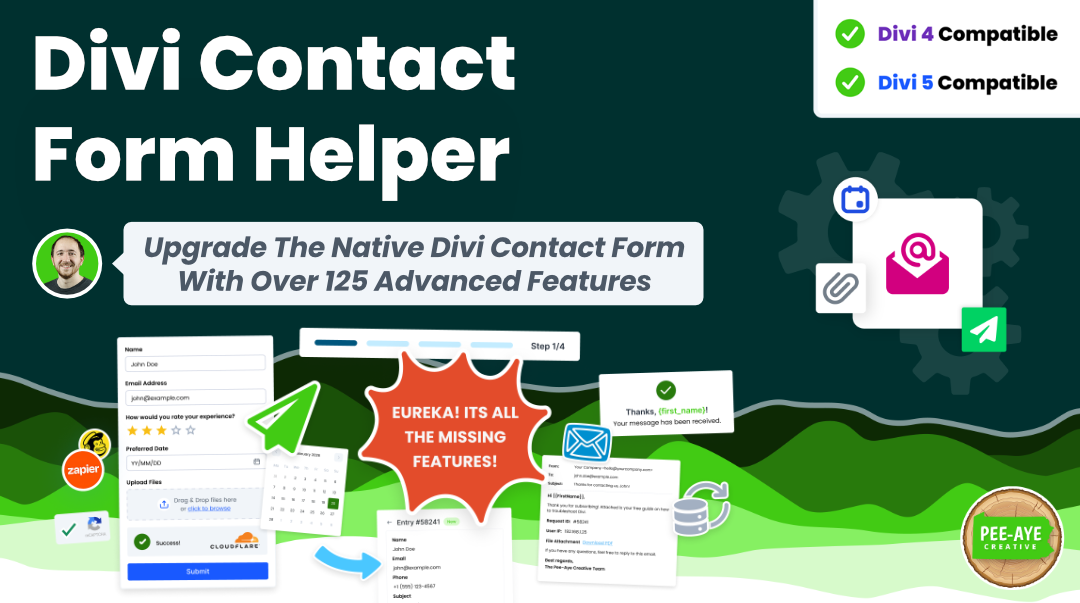
Enjoy These Incredible Features!
This powerful plugin adds over 125 features and settings to the native Divi Contact Form module, giving you new field types, multi-step forms, conditional logic, email options, spam protection, saving entries to the database, submission management, integrations, and much more, all directly inside Divi.

Upgrade The Divi Contact Form With Over 125 New Features And Settings
The default Divi Contact Form module is a great starting point, but many common form features require workarounds, custom code, or switching to dedicated WordPress form plugins. As forms become more advanced, users often discover missing functionality related to fields, emails, validation, integrations, styling, submissions, navigation, and user experience. Our Divi Contact Form Helper plugin solves this by expanding the native Divi Contact Form module with over 125 additional features and settings that work directly inside the Divi Builder. You can add advanced field types, improve email workflows, customize validation and messaging, create multi-step forms, connect external services, manage submissions, and fine tune the design and behavior of every part of the form while continuing to use Divi’s familiar interface.
⚡Quick Highlights
- Add over 125 features and settings to the Divi Contact Form
- Build advanced forms without leaving the Divi Builder
- Customize submissions, emails, fields, styling, and integrations
Form Building And Fields
Add more field types, layouts, and controls to create flexible and advanced Divi contact forms.

Add A File Upload Field To The Divi Contact Form
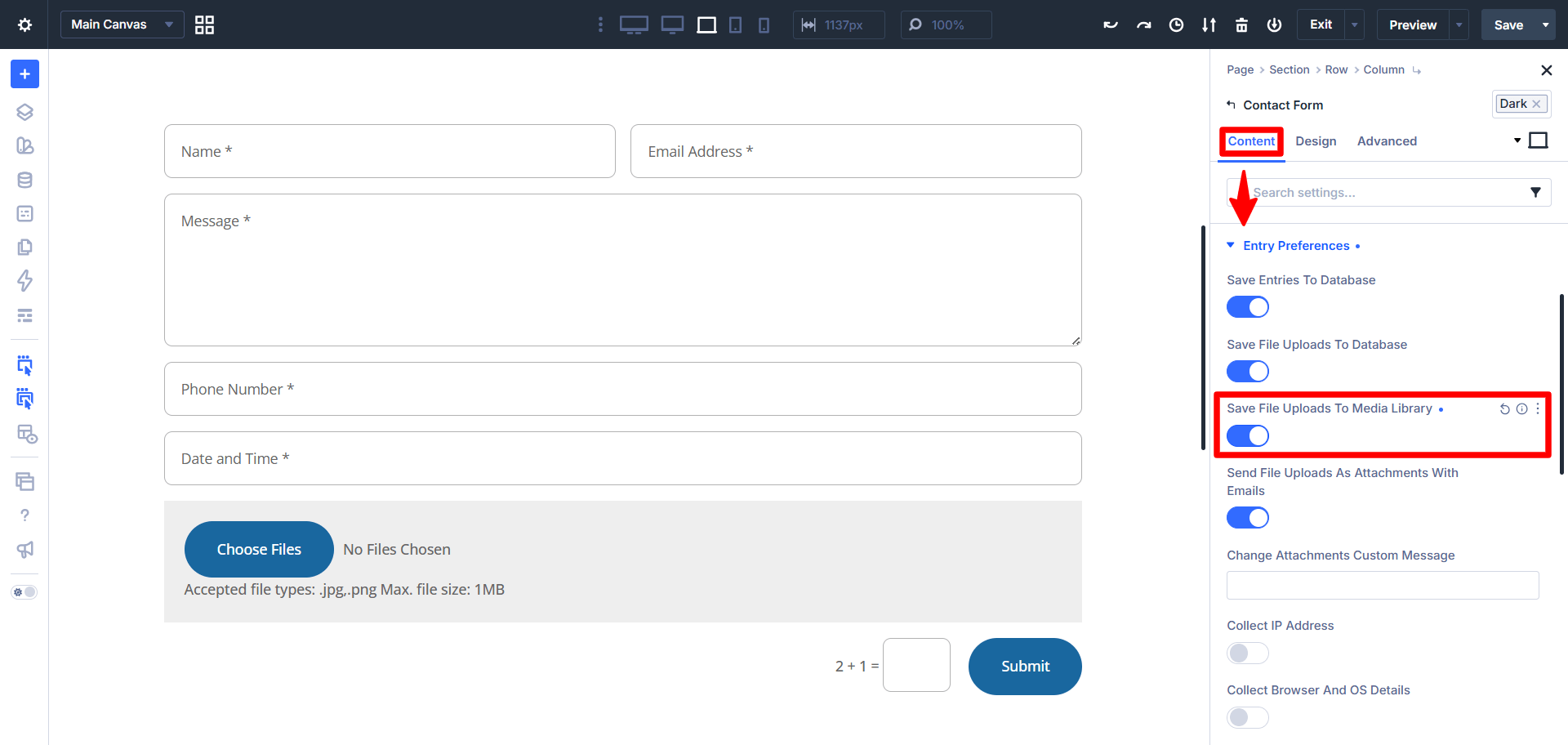
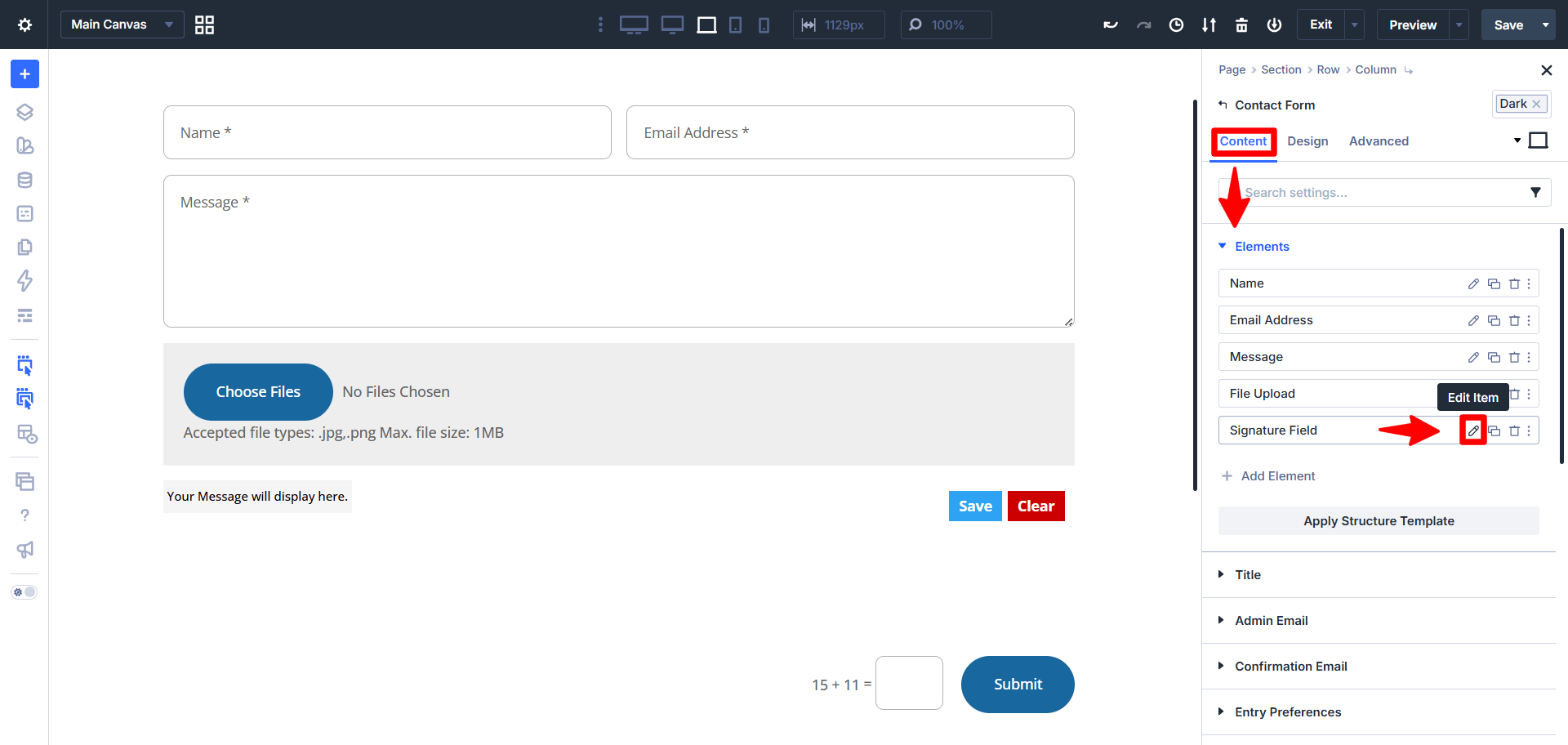
The default Divi Contact Form module does not support file uploads, which makes it difficult to collect resumes, project files, documents, images, or other important attachments directly through your forms. Our Divi Contact Form Helper plugin solves this by adding a dedicated file upload field to the Divi Contact Form so users can attach files as part of their submission. You can control file size limits, allowed file types, storage location, email attachments, and upload labels while keeping the experience fully integrated into your form design.
⚡Quick Highlights
- Add file upload fields directly to Divi contact forms
- Control allowed file types and maximum upload size
- Save uploaded files to Media Library and include them in email notifications
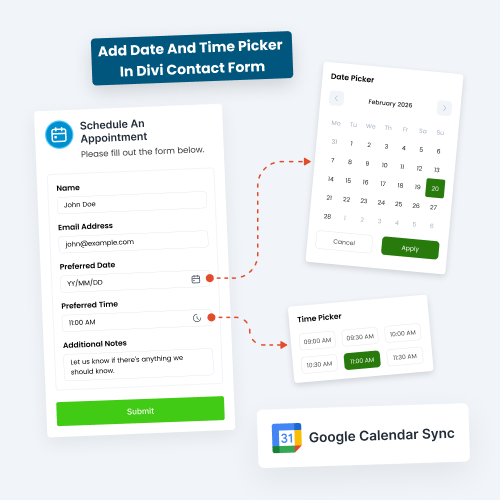
Add Date And Time Picker Fields To The Divi Contact Form
The default Divi Contact Form module does not include date or time picker fields, which makes it difficult to create appointment requests, booking forms, scheduling workflows, or forms that depend on availability. Our Divi Contact Form Helper plugin solves this by adding dedicated date picker, time picker, and combined datetime picker fields directly inside the Divi Contact Form module. You can control formats, available dates and times, booking rules, and scheduling options while also syncing availability from supported calendar feeds, all while matching the design of your existing form.
⚡Quick Highlights
- Add date picker, time picker, or datetime picker fields to any form
- Control formats, availability windows, and scheduling options
- Sync availability from calendars and customize the design visually

Create Multi Step Forms Directly In The Divi Contact Form Module
Creating multi-step forms in Divi has traditionally required switching to dedicated WordPress form plugins or giving up the flexibility of the native Divi Contact Form module. This makes it difficult to build longer forms while keeping everything inside the Divi Builder experience. Our Divi Contact Form Helper plugin solves this by adding a fully integrated multi-step form system directly to the Divi Contact Form module in Divi 5. Simply add Page Break fields to divide your form into steps, then customize navigation, progress indicators, validation behavior, animations, and every visual detail using Divi’s familiar Content and Design settings. This makes it possible to build advanced multi-step experiences while continuing to work inside the native Divi workflow.
⚡Quick Highlights
- Create multi-step forms using Page Break fields inside Divi
- Customize progress indicators navigation and step validation
- Design every part of the multi-step experience visually

Add Search And Better Selection Controls To Divi Contact Form Dropdown Fields
Dropdown fields can quickly become frustrating when they contain long lists of options or require users to repeatedly choose the same values. The default Divi Contact Form module provides limited controls for improving the selection experience, which can make forms slower and more difficult to complete. Our Divi Contact Form Helper plugin solves this by adding search functionality to dropdown fields and allowing you to define default selected options. These improvements help users find options faster and reduce friction when completing more advanced forms.
⚡Quick Highlights
- Add search functionality to dropdown fields
- Improve form usability for longer option lists
- Find options easier without awkward scrolling

Customize Checkbox And Radio Button Layouts In Divi Contact Forms
The default layout of checkbox and radio button fields does not always work well for longer option lists or more structured form layouts. Large groups of choices can become difficult to scan and may take up unnecessary vertical space. Our Divi Contact Form Helper plugin solves this by giving you control over how checkbox and radio button options are displayed. You can choose between horizontal and vertical layouts and organize options into multiple columns to create cleaner and easier-to-use forms.
⚡Quick Highlights
- Choose horizontal or vertical option layouts
- Display options in multiple columns
- Improve readability for larger choice groups

Apply Custom Phone Number Formatting In Divi Contact Forms
Collecting phone numbers through forms can lead to inconsistent formatting and make submissions harder to review, contact, or process later. The default Divi Contact Form module does not provide a way to control how phone numbers should be entered, which can result in messy or unpredictable data. Our Divi Contact Form Helper plugin solves this by letting you define custom phone number formats directly in the Divi Contact Form settings and automatically applying that format as users type. This helps guide visitors toward entering phone numbers correctly, creates more consistent submissions, and gives you better control over how contact information is collected.
⚡Quick Highlights
- Define custom phone number formats for each form
- Automatically apply formatting while users type
- Collect more consistent and easier-to-use phone data

Add Icons To Divi Contact Form Fields For Better Visual Guidance
Forms that rely only on placeholder text can sometimes feel difficult to scan or less visually engaging, especially when collecting multiple types of information. The default Divi Contact Form module does not provide built-in support for field icons, limiting visual guidance opportunities. Our Divi Contact Form Helper plugin solves this by letting you place icons inside contact form fields using the standard icon picker in Divi and customize their color to match your design. This helps visitors identify inputs more quickly and creates a more polished form experience.
⚡Quick Highlights
- Add icons directly inside form fields
- Customize icon appearance and colors
- Improve visual clarity and form design

Add Star Rating Fields To Divi Contact Forms
The default Divi Contact Form module does not include a way to collect ratings directly inside form submissions, which makes it difficult to gather simple feedback without using another plugin or building a separate system. Our Divi Contact Form Helper plugin solves this by adding a star rating field that lets visitors select a rating visually as part of the form submission. Ratings can then be included in notifications using merge tags, making it easy to collect and review feedback directly from your existing forms.
⚡Quick Highlights
- Add star rating fields directly to contact forms
- Let visitors select ratings visually
- Include ratings in notifications emails using merge tags

Add Headings, Dividers, HTML, And Custom Content Between Divi Contact Form Fields
The default Divi Contact Form module does not provide a way to add structure, explanations, or visual separation between fields, which can make longer or more detailed forms difficult to understand and navigate. Our Divi Contact Form Helper plugin solves this by adding a dedicated content field that allows you to insert headings, paragraphs, dividers, links, images, custom HTML, and other display elements directly inside your form layout. Because this content is display-only and not submitted with the form, you can create clearer sections, provide instructions, highlight important details, and improve the overall form experience without affecting the submitted data.
⚡Quick Highlights
- Add headings, dividers, and content between form fields
- Insert links, images, custom HTML, and instructions
- Organize complex forms without affecting submissions

Show Labels, Hide Placeholders, And Add Field Descriptions In Divi Contact Forms
The default Divi Contact Form module offers limited control over how field text is displayed, which can make forms harder to understand and less accessible for visitors. Relying only on placeholders can also reduce clarity once users begin entering information. Our Divi Contact Form Helper plugin solves this by giving you full control over labels, placeholders, and field descriptions for every contact form field. You can choose which text elements to display, add helpful descriptions beneath inputs, and customize their appearance to create forms that are clearer, easier to complete, and better aligned with your site design.
⚡Quick Highlights
- Show or hide labels for individual fields
- Add descriptions beneath inputs for better guidance
- Customize text styling to match your form design
Email And Notifications
Improve how your Divi contact forms send, customize, and route email notifications.

Add Advanced Admin Email Notification Features To The Divi Contact Form
The default Divi Contact Form admin email settings are limited and can make it difficult to personalize notifications, route messages to the right people, or include important submission details. Our Divi Contact Form Helper plugin solves this by expanding the admin email system with dynamic email addresses, customizable subjects and sender details, CC and BCC support, rich text formatting, advanced merge tags, and conditional email routing. This makes it easier to build professional notification workflows, direct messages to the correct team automatically, include more context in notification emails, and reduce the need for additional email plugins or manual follow-up.”
⚡Quick Highlights
- Customize admin email content using rich text, HTML, and merge tags
- Dynamically set email recipients and sender information
- Conditionally route notifications based on form selections

Conditionally Route Divi Contact Form Emails To Different Recipients Based On User Input
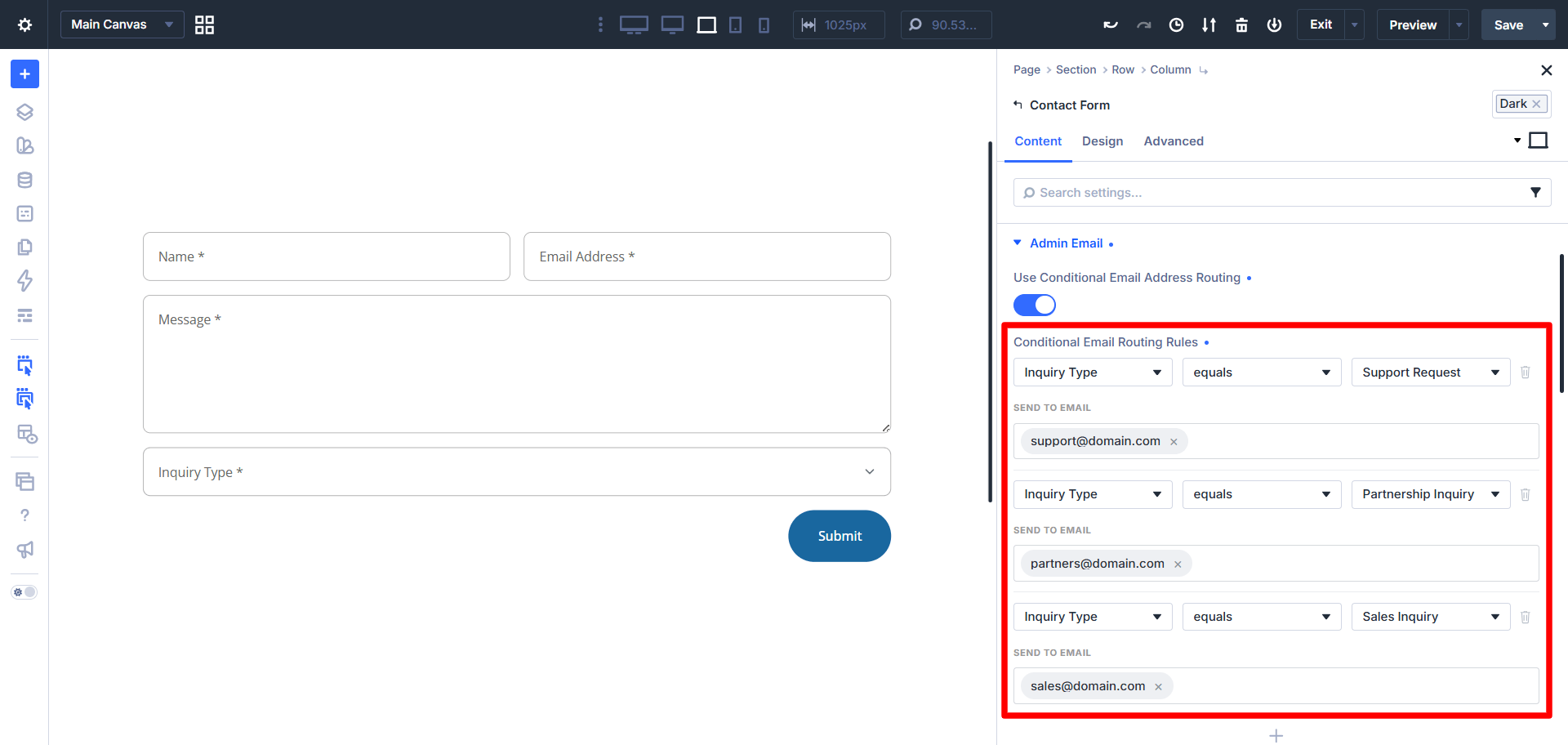
Sending every contact form submission to the same email address can create unnecessary manual work and make it harder to route messages to the correct team, department, or person. Forms that collect different request types often need smarter handling so submissions reach the right destination automatically. Our Divi Contact Form Helper plugin solves this by adding visual conditional email routing directly to the Divi Contact Form. You can select a field, define conditions using an interface similar to Divi’s conditional logic system, and assign one or more email addresses based on the visitor’s selections. This makes it easy to build intelligent routing workflows without creating multiple forms or managing complicated email rules.
⚡Quick Highlights
- Route emails using visual conditional logic
- Send submissions to different recipients automatically
- Assign one or more email addresses for each condition

Create Dynamic Admin Email Subject Lines In Divi Contact Forms
Using the same generic subject line for every contact form notification can quickly make your inbox difficult to manage and cause email threads to become grouped together in unhelpful ways. This makes it harder to identify submissions at a glance and find important messages later. Our Divi Contact Form Helper plugin solves this by letting you create custom admin email subject lines and dynamically personalize them using merge tags. You can include information such as the form name, submitter details, entry number, and other dynamic values to create more meaningful notifications that are easier to organize and manage.
⚡Quick Highlights
- Create custom subject lines for admin notifications
- Insert dynamic values using merge tags
- Reduce inbox clutter and unwanted email threading
Insert Advanced Dynamic Merge Tags Into Divi Contact Form Emails And Messages
Divi includes basic message pattern functionality, but it can quickly become limiting when you need to personalize notifications or include more context in form submissions. Standard fields alone are often not enough when building professional contact workflows or creating more useful confirmation messages. Our Divi Contact Form Helper plugin solves this by extending Divi’s merge tag system with advanced dynamic variables that let you insert form details, user information, page data, site details, and additional submission context directly into emails and messages. You can personalize communication automatically, reduce repetitive setup, and create more informative notifications without manual editing.
⚡Quick Highlights
- Insert dynamic form, user, page, and site information
- Use advanced merge tags beyond Divi’s default options
- Personalize admin and confirmation messages with merge tags

Send Auto Responder Confirmation Emails From Divi Contact Forms
The default Divi Contact Form module does not include confirmation emails, which means users receive no acknowledgment after submitting a form unless additional tools are installed. Our Divi Contact Form Helper plugin solves this by sending fully customizable auto responder emails to the person who completed the form. You can personalize the subject, sender details, content, formatting, attachments, and reply settings while using dynamic merge tags to include submitted information and create a more professional follow-up experience.
⚡Quick Highlights
- Send automatic confirmation emails after form submission
- Personalize content using rich text formatting, HTML, and merge tags
- Customize sender details, attachments, and reply settings

Integrate Your SMTP Server To Improve Divi Contact Form Email Delivery
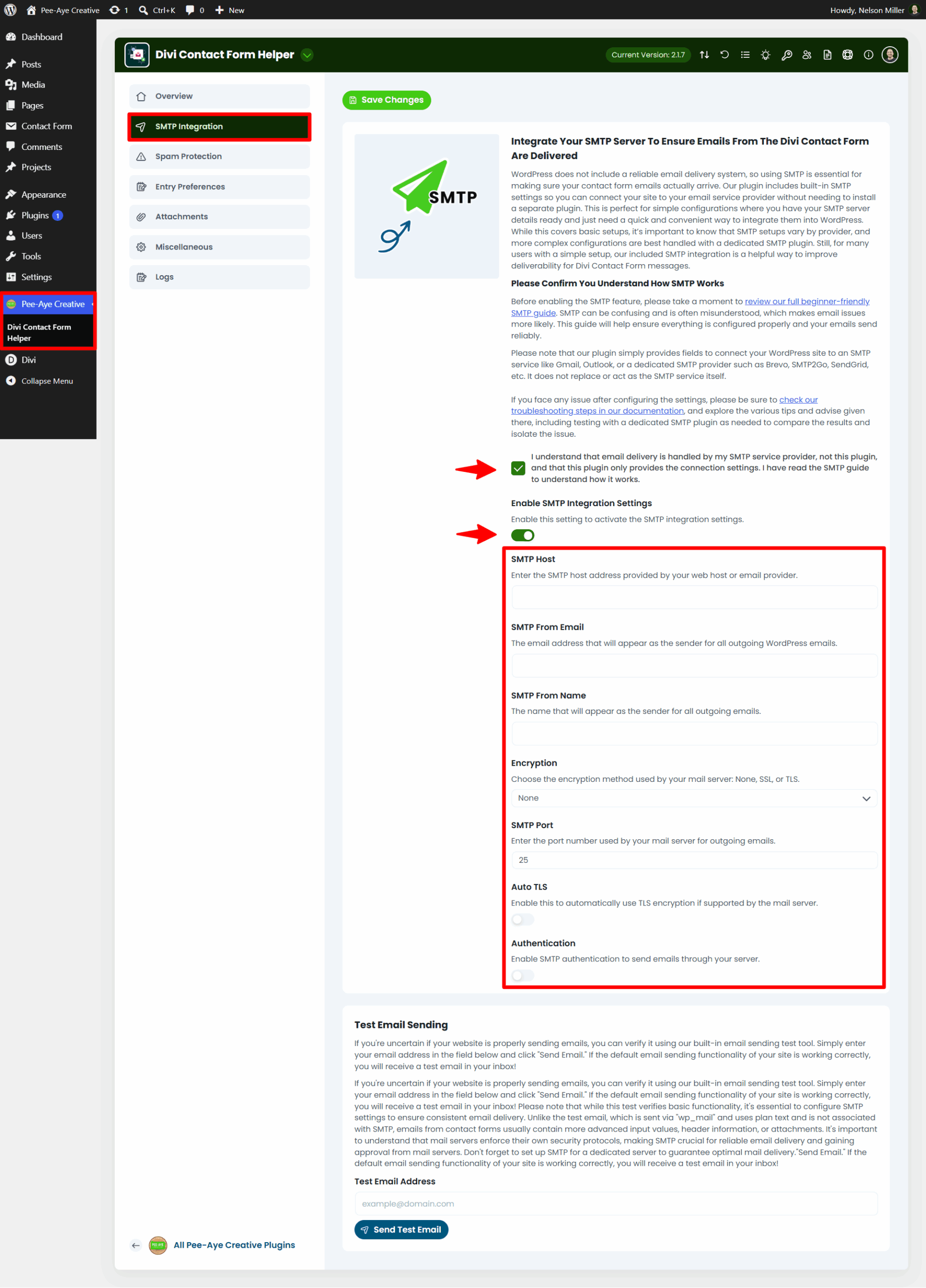
Email delivery can sometimes be unreliable in WordPress, and configuring SMTP is often one of the first steps users take to improve how contact form emails are sent. While many sites use dedicated SMTP plugins for advanced delivery features and provider-specific setups, some users simply want a convenient way to enter their SMTP settings without installing another plugin. Our Divi Contact Form Helper plugin solves this by including built-in SMTP configuration settings that allow you to connect your existing email service directly from the plugin settings. This provides a simple and convenient option for basic SMTP setups while still leaving more advanced email requirements to dedicated SMTP solutions.
⚡Quick Highlights
- Configure SMTP directly from the plugin settings
- Avoid installing another plugin for simple setups
- Improve reliability when sending emails from contact forms
Spam Protection And Security
Protect your Divi contact forms from spam while giving you more control over unwanted submissions.

Stop Spam And Prevent Unwanted Submissions In Divi Contact Forms
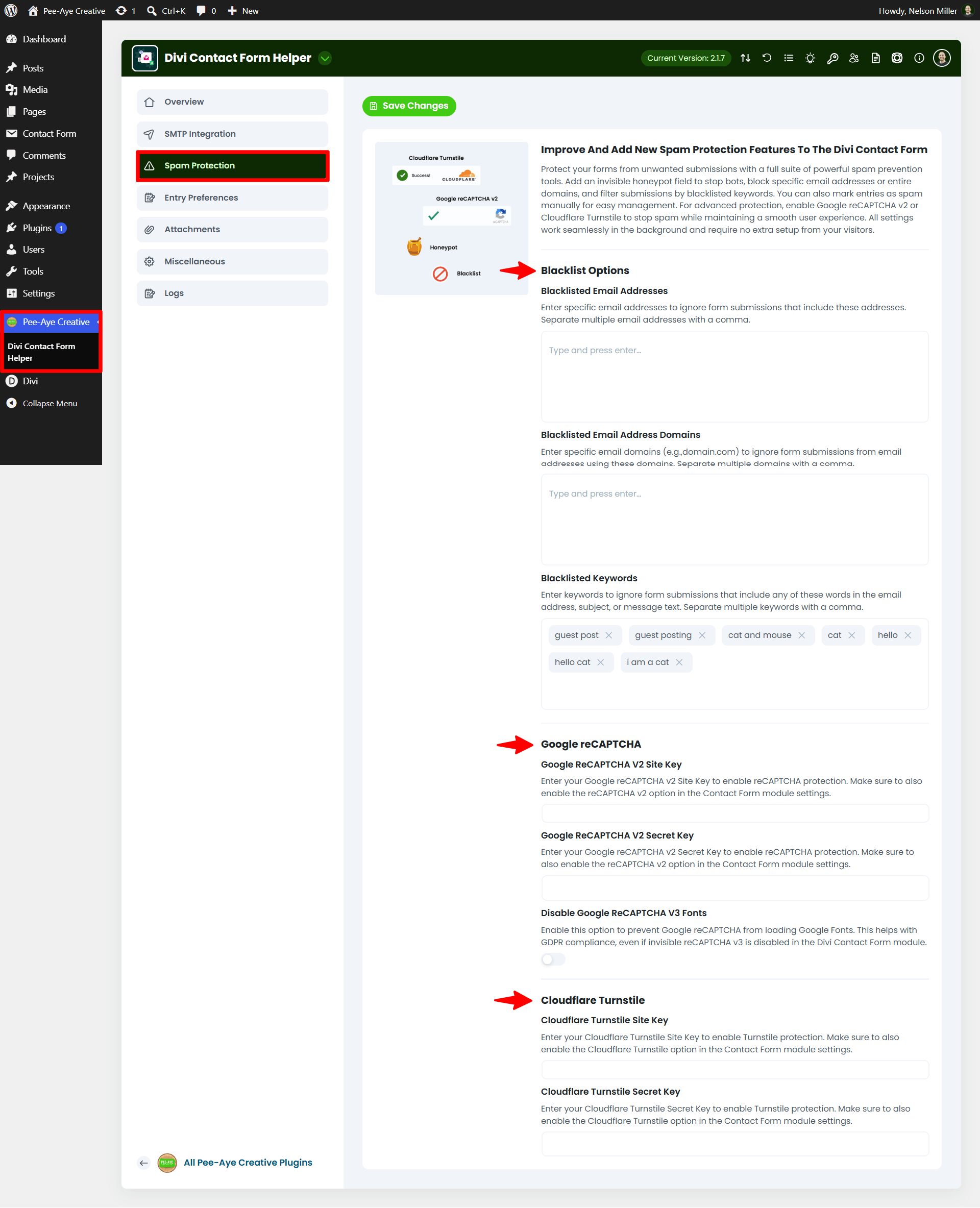
Spam submissions are a common problem with the default Divi Contact Form module and can create unnecessary work while making it harder to identify legitimate messages. Our Divi Contact Form Helper plugin solves this by adding multiple layers of spam protection directly into your forms. You can stop automated bots with an invisible honeypot, block unwanted submissions using keywords, email addresses, domains, URLs, and IP rules, manually flag suspicious entries, and enable Google reCAPTCHA v2 checkbox or Cloudflare Turnstile for additional protection without creating unnecessary friction for visitors.
⚡Quick Highlights
- Block spam using invisible honeypot fields and blacklist rules
- Filter submissions by keywords, URLs, IP addresses, and email domains
- Enable Google reCAPTCHA v2 checkbox or Cloudflare Turnstile protection
Submissions And Analytics
Save, organize, analyze, and manage your Divi contact form submissions with more control.
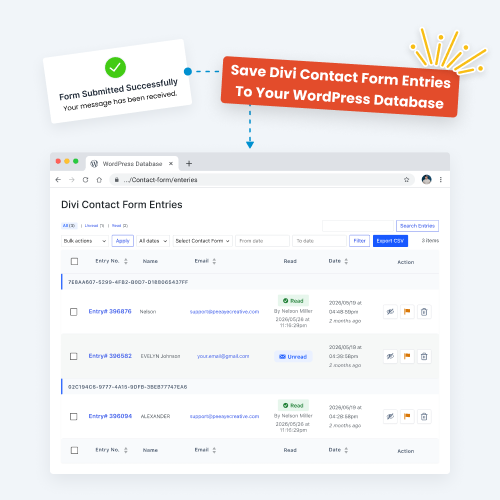
Save Divi Contact Form Entries To Your WordPress Database
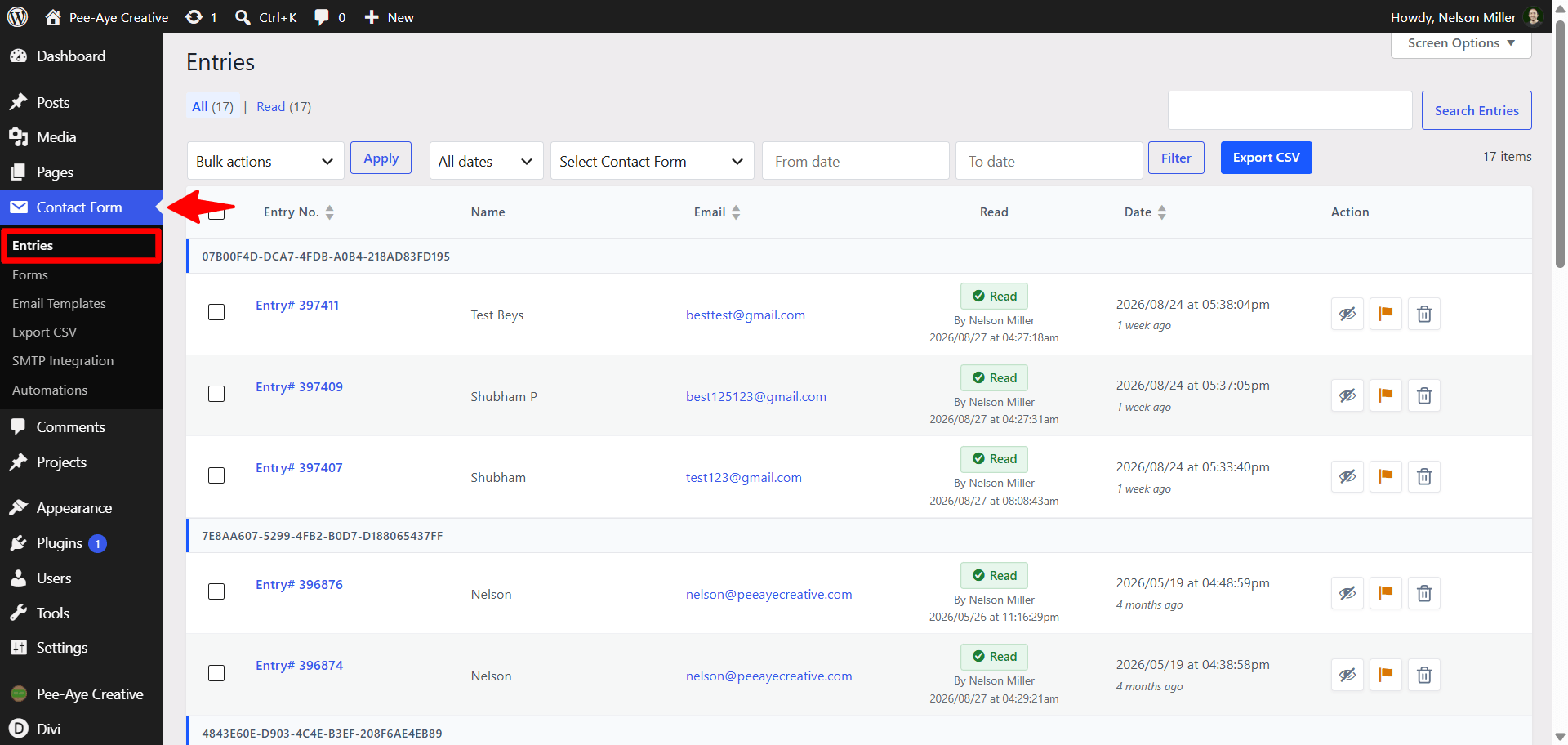
One of the biggest limitations of the default Divi Contact Form module is that submissions are not saved to the database after they are sent. If an email fails, gets filtered, or is accidentally deleted, valuable leads and messages can be lost with no way to recover them. Our Divi Contact Form Helper plugin solves this by saving Divi contact form entries directly to your WordPress database and providing a complete entry management experience where you can search, sort, review, reply to, export, back up, and even convert submissions into WordPress content, making it easier to manage communication and protect important data over time.
⚡Quick Highlights
- Save Divi contact form entries directly to the WordPress database
- Search, reply to, export, and manage submissions in one admin area
- Convert entries into WordPress content and create backups

Customize How Divi Contact Form Entries Are Backed Up Accessed And Managed
Saving Divi contact form submissions is only the beginning, because over time you may need better ways to back up entries, control who can access them, organize the admin view, and clean up old submissions automatically. Our Divi Contact Form Helper plugin solves this by adding dedicated entry settings that let you customize how saved submissions are handled after they are received. You can schedule automatic spreadsheet backups, send them to a custom email address, automatically delete old entries after a selected number of days, enable sent email and clone logs, customize which columns appear in the entry list, choose your preferred date and time format, and restrict access to saved entries by user role. These settings make it easier to keep contact form data organized and maintain it over time.
⚡Quick Highlights
- Schedule automatic spreadsheet backups and choose where they are sent
- Restrict access and customize the entry list view
- Automatically delete old entries and enable activity logs

Save Additional User And Submission Details With Divi Contact Form Entries
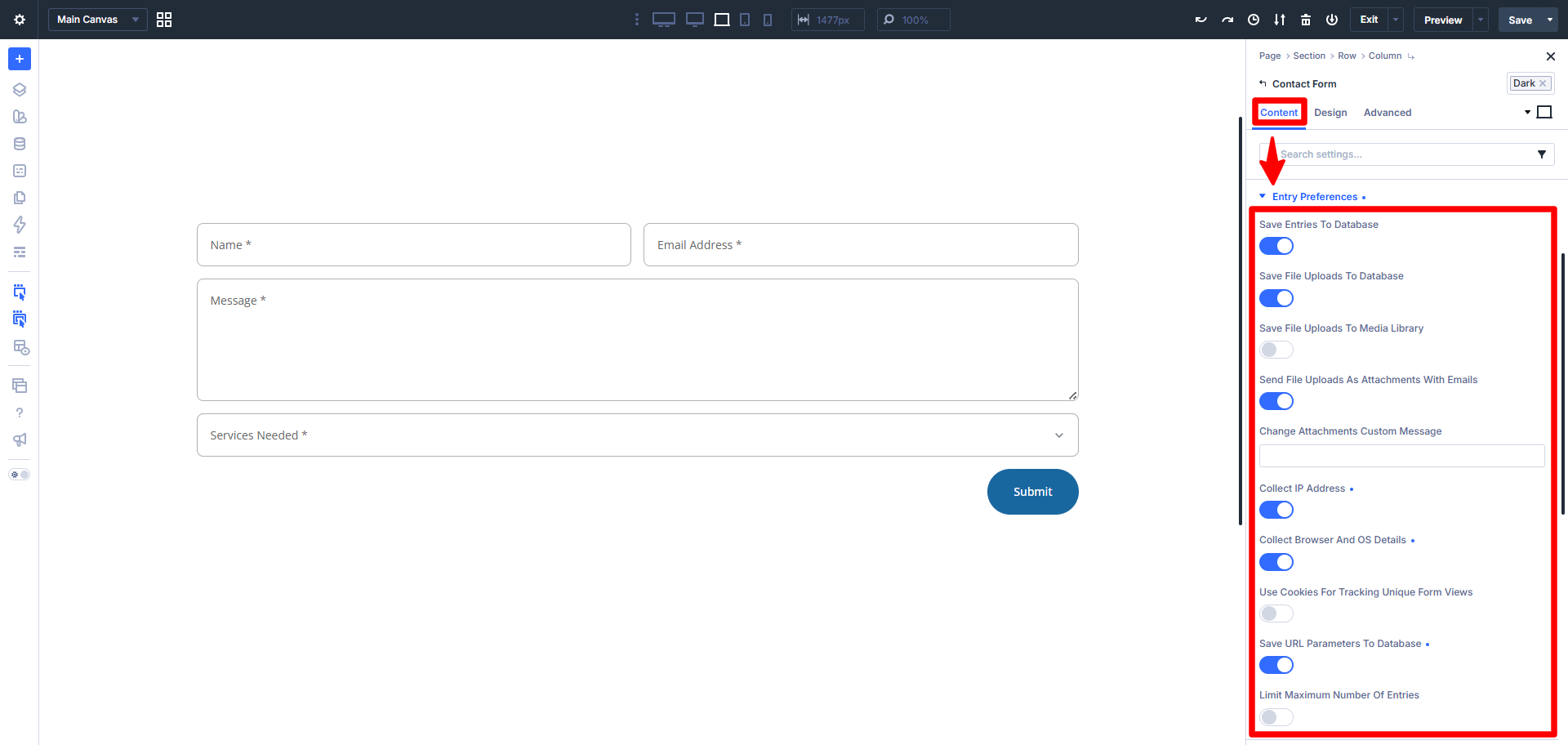
Form submissions sometimes need more context than the values entered into the fields, especially when troubleshooting issues, reviewing submissions, or understanding where entries came from. The default Divi Contact Form module does not provide options for collecting additional submission details alongside the form data. Our Divi Contact Form Helper plugin solves this by letting you optionally store additional information with each submission, including IP address, browser details, user agent information, and logged in user details when available. These settings can be enabled only when needed, giving you more context while keeping full control over what information is collected.
⚡Quick Highlights
- Save IP address and browser information with submissions
- Collect user agent and logged in user details when available
- Enable or disable additional data collection per form

Track Divi Contact Form Views Entries And Conversion Rates
It can be difficult to understand how well your contact forms are performing when you only see submitted entries and have no visibility into how many visitors actually viewed the form. Without additional insight, it becomes harder to evaluate engagement or identify opportunities to improve conversion. Our Divi Contact Form Helper plugin solves this by tracking form views and unique views using an optional cookie system and displaying submission counts and calculated conversion rates directly in the WordPress admin area. This gives you a clearer picture of how your forms are performing and helps you make more informed decisions.
⚡Quick Highlights
- Track total and unique form views
- Compare views against submitted entries
- Monitor conversion rates directly in WordPress
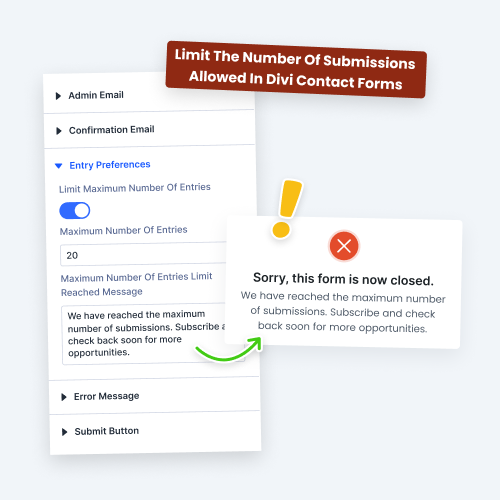
Limit The Number Of Submissions Allowed In Divi Contact Forms
The default Divi Contact Form module does not provide a way to limit how many entries can be submitted, which can create problems for event registrations, applications, giveaways, bookings, or any situation with limited availability. Our Divi Contact Form Helper plugin solves this by letting you set a maximum number of submissions for each Divi contact form and display a custom message once the limit has been reached. This allows you to automatically stop collecting entries at the right time without needing to manually disable the form or make site changes.
⚡Quick Highlights
- Set a maximum total number of allowed submissions
- Show a custom message after the limit is reached
- Automatically stop collecting new entries
Integrations
Connect Divi contact forms with external apps and services to automate your workflows.

Connect Divi Contact Forms To Your Favorite Apps And Services
Divi does not include built-in integrations for sending contact form data to external services, which can make automation and workflow management difficult and often requires extra plugins or manual processes to move submissions between tools. Our Divi Contact Form Helper plugin solves this by making it easy to connect Divi contact forms with platforms like Zapier and Pabbly Connect or send submissions directly to external systems using webhooks. This gives you flexible options for automating tasks, connecting form data with the tools you already use, and creating more efficient workflows without custom development.
⚡Quick Highlights
- Connect Divi forms to Zapier and Pabbly Connect
- Send form data directly to custom webhook endpoints
- Automate workflows without extra plugins or custom code
Customization And User Experience
Customize messages, validation, translations, redirects, and other details to create a better form experience.
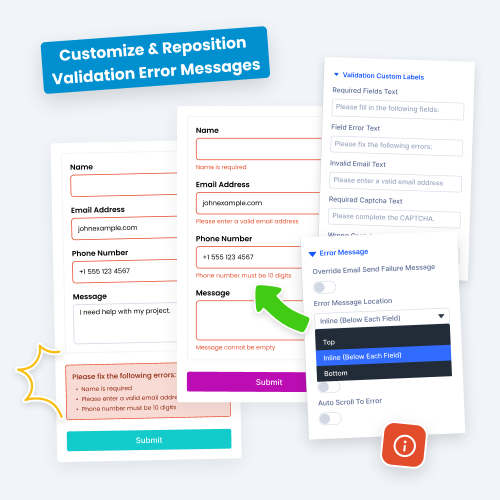
Customize And Improve Divi Contact Form Validation Error Messages
The default Divi Contact Form validation messages can be difficult to notice and offer limited control over both wording and presentation, which may leave visitors confused about why their form submission is not working. Error messages shown at the top of the form can be especially easy to miss, creating unnecessary friction and failed submissions. Our Divi Contact Form Helper plugin solves this by giving you full control over validation labels, error message placement, and error message styling directly inside the Divi Contact Form settings. You can customize text for required fields, invalid emails, CAPTCHA validation, and other error states, move validation messages to a more visible location, and fully style the error container and text to create a clearer and more user-friendly submission experience.
⚡Quick Highlights
- Customize required field, email, and CAPTCHA validation text
- Move validation messages to a more visible location
- Style the error container and text using full design settings
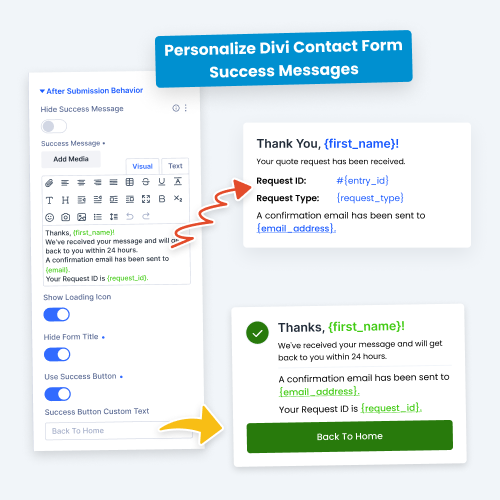
Personalize And Customize Divi Contact Form Success Messages
The default Divi Contact Form success message is limited and does not provide many options for formatting, personalization, or controlling what users see after submitting the form. This can make confirmations feel disconnected from the rest of your site and limit opportunities to guide visitors to the next step. Our Divi Contact Form Helper plugin solves this by letting you fully customize the success message using rich text, HTML, dynamic merge tags, and optional success buttons with custom links. You can personalize messages, improve the submission experience, and direct users to additional content or actions after the form is completed.
⚡Quick Highlights
- Create personalized success messages using merge tags
- Add rich text formatting or HTML content
- Show an optional success button with custom links

Redirect Users To Any Page After Submitting Divi Contact Forms
The default Divi Contact Form success flow is limited and does not provide flexible options for controlling what happens after a form is submitted. This can make it harder to guide visitors to the next step, deliver resources, show confirmation pages, or continue conversion flows. Our Divi Contact Form Helper plugin solves this by letting you automatically redirect users after submission using either a page on your website or a custom URL. You can also control redirect timing to delay the transition when needed and create a smoother post-submission experience that fits your workflow.
⚡Quick Highlights
- Redirect users automatically after form submission
- Choose between internal pages or custom URLs
- Control redirect timing for a smoother experience
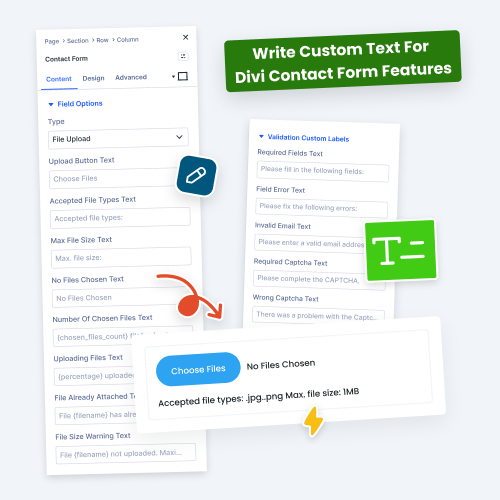
Write Custom Text For Divi Contact Form Messages And Features
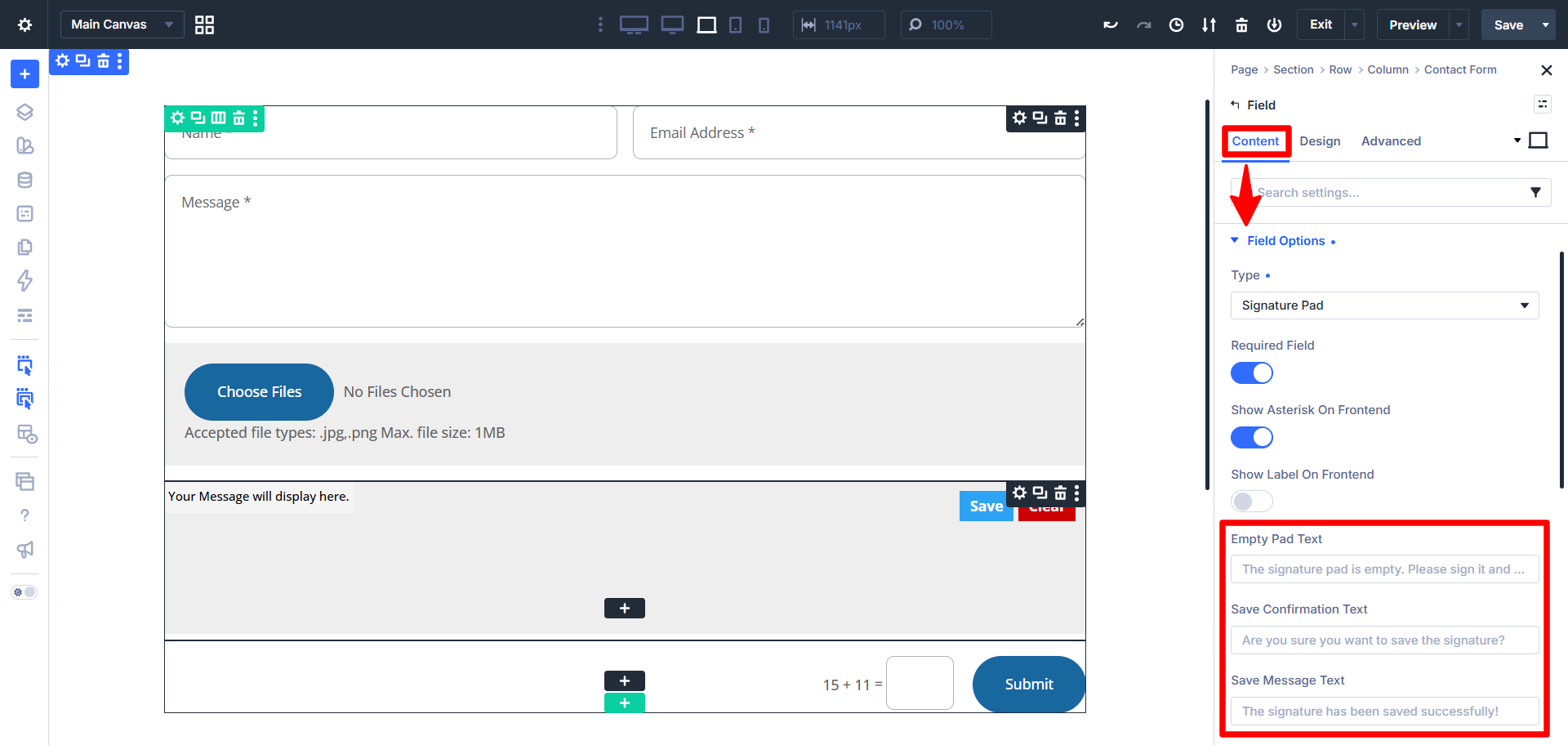
Divi provides limited control over the wording used throughout the contact form experience, and additional form features often require text that matches your site’s tone, instructions, and branding. Our Divi Contact Form Helper plugin solves this by letting you customize text throughout supported contact form features directly where those settings are used. You can write your own validation messages, labels, instructions, and feature-specific text for areas like file uploads, CAPTCHA, email verification, and other form interactions so the entire experience feels more consistent and tailored to your site.
⚡Quick Highlights
- Write custom validation and required field messages
- Customize text for file uploads, signature fields, and other features
- Control wording for CAPTCHA, email verification, and more

Translate Divi Contact Form Text For Multilingual Websites
Creating multilingual contact forms can become difficult when custom labels, messages, descriptions, and other text need to appear correctly in different languages. While Divi handles much of the standard contact form translation, additional text and features added by Divi Contact Form Helper also need to support the languages used on your site. Our Divi Contact Form Helper plugin solves this by adding multilingual language settings for the text used throughout its extended contact form features, including custom messages, labels, descriptions, and other feature-specific text. You can also set the language for features such as the date and time picker so your forms provide a consistent experience for visitors in different languages.
⚡Quick Highlights
- Translate custom labels, messages, descriptions, and feature text
- Set languages for text used by Divi Contact Form Helper features
- Choose the language used by the date and time picker
Feature Comparison: Our Plugin vs. Native Divi
See how Divi Contact Form Helper expands the capabilities of the native Divi Contact Form with additional fields, settings, customization options, and advanced form management tools.
Additional Form Fields
Add new field types to the native Divi Contact Form so you can build forms that collect more than the standard information supported by Divi.
| Feature | Ours | Divi |
|---|---|---|
| Input Field | — | |
| Email Field | — | |
| Textarea Field | — | |
| Checkbox Field | — | |
| Radio Button Field | — | |
| Select Dropdown Field | — | |
| File Upload Field | ||
| Date Picker Field | ||
| Date Range Picker Field | ||
| Time Picker Field | ||
| Star Rating Field | ||
| Digital Signature Field | ||
| HTML / Custom Content Field | ||
| Multi-Step Forms |
File Uploads
Add file uploads directly to your Divi contact forms with controls for file types, upload limits, storage, and the upload field itself.
| Feature | Ours | Divi |
|---|---|---|
| File Uploads | ||
| Allowed File Types | ||
| Maximum Upload Size | ||
| Custom MIME Types | ||
| Save Uploads To Media Library | ||
| Secure Attachment Delivery | ||
| Custom File Upload Label Text | ||
| File Upload Design Settings |
Date & Time Fields
Create scheduling and booking-style forms with flexible date and time restrictions, availability rules, calendar synchronization, and visual customization.
| Feature | Ours | Divi |
|---|---|---|
| Disable Past Dates | ||
| Disable Days of the Week | ||
| Disable Current Date | ||
| Fixed or Relative Date Selection | ||
| Available and Unavailable Dates | ||
| Google and Outlook Calendar Sync (ICS) | ||
| Disable Past Times | ||
| Fixed or Relative Time Selection | ||
| Available and Unavailable Times (Global) | ||
| Available and Unavailable Times (Per Day) | ||
| Date/Time Picker RTL Support | ||
| Date/Time Picker Width and Height | ||
| Date/Time Picker Design Settings |
Field Customization
Customize the way fields are labeled, described, displayed, and presented so your forms can provide clearer instructions and a more polished experience.
| Feature | Ours | Divi |
|---|---|---|
| Basic Field Styling | — | |
| Add Icons To Fields | ||
| Custom Field Label Text | ||
| Show or Hide Field Labels | ||
| Individual Field Label Visibility | ||
| Move Labels to the Left of Fields | ||
| Custom Placeholder Text | ||
| Hide Placeholder Text | ||
| Field Description Text | ||
| HTML Support in Field Descriptions | ||
| Field Description Position (Above or Below) | ||
| Field Label Design Settings | ||
| Field Description Design Settings | — | |
| Required Fields | — | |
| Required Field Asterisks |
Advanced Field Options
Add additional controls to standard Divi fields for more flexible layouts, selection controls, ratings, phone numbers, and text input.
| Feature | Ours | Divi |
|---|---|---|
| Conditional Logic For Fields | — | |
| Checkbox Columns / Inline Layouts | ||
| Radio Button Columns / Inline Layouts | ||
| Searchable Dropdown Options | ||
| Default Dropdown Selection | ||
| Custom Phone Number Formatting | ||
| Textarea Minimum Height | ||
| Textarea Character Minimum / Maximum | ||
| Textarea Character Validation |
Custom Form Content
Insert additional content between form fields to organize complex forms and provide instructions, headings, links, images, and other visual content.
| Feature | Ours | Divi |
|---|---|---|
| HTML / Custom Content Field | ||
| Nested Modules Within Form | — |
Multi-Step Forms
Turn long forms into guided multi-step experiences with page breaks, progress indicators, navigation, validation, and customizable step controls.
| Feature | Ours | Divi |
|---|---|---|
| Multi-Step / Page Break Fields | ||
| Conditional Logic For Multistep Steps | ||
| Progress Indicators | ||
| Step Navigation Controls | ||
| Step Validation | ||
| Multi-Step Design Settings |
Admin Email Notifications
Customize how form submissions are sent to administrators, including recipients, subjects, sender information, formatting, templates, and conditional routing.
| Feature | Ours | Divi |
|---|---|---|
| Admin Email Notifications | — | |
| Enable / Disable Admin Email | ||
| Custom Admin Email Subject | ||
| Dynamic Admin Email Subject Using Merge Tags | ||
| Custom Admin Email From Name | ||
| Use Submitter Email as Admin Email Sender | ||
| Dynamic Admin Email Recipients | ||
| Conditional Email Routing | ||
| Admin Email CC / BCC | ||
| Rich Text / HTML Admin Emails | ||
| Dynamic Admin Email Templates |
Confirmation Emails
Send automatic confirmation emails to people who submit your forms with customized content, sender information, templates, merge tags, and attachments.
| Feature | Ours | Divi |
|---|---|---|
| Confirmation Emails to Form Submitters | ||
| Custom Confirmation Email Subject | ||
| Select Email Address From a Form Field | ||
| Custom Confirmation Email From Name | ||
| Custom Confirmation Email From Address | ||
| Rich Text / HTML Confirmation Emails | ||
| Dynamic Confirmation Email Templates | ||
| Confirmation Email Attachments |
Merge Tags & Dynamic Content
Use submission data dynamically throughout emails, messages, and other supported areas of the contact form.
| Feature | Ours | Divi |
|---|---|---|
| Message Pattern Merge Tags | — | |
| Additional Custom Merge Tags | 30+ More! | |
| Merge Tags in Admin Email Subjects | ||
| Merge Tags in Success Messages | ||
| Submission Details Merge Tags | ||
| System Information Merge Tags | ||
| Upload Files Merge Tags |
Saved Entries & Submission Management
Save contact form submissions in WordPress and manage, review, reply to, export, back up, and work with entries directly from the dashboard.
| Feature | Ours | Divi |
|---|---|---|
| Save Entries to WordPress Database | ||
| View Form Entries in WordPress | ||
| Mark Entries as Read / Unread | ||
| Reply to Entries | ||
| Add Custom Columns to Entries List | ||
| Collect Submission Meta Details | ||
| Collect User Agent Details | ||
| Limit Number of Entries | ||
| Custom Maximum Entries Reached Message | ||
| Convert Entries to WordPress Posts | ||
| Export Entries to CSV | ||
| Automatic Entry Backups | ||
| Automatically Delete Entries After a Set Number of Days |
Form Analytics
Track form views, unique views, submissions, and conversion rates to understand how your contact forms are performing.
| Feature | Ours | Divi |
|---|---|---|
| List of Forms on Site | ||
| Total Form Views | ||
| Unique Form Views | ||
| Cookie Control for Unique Views | ||
| Form Conversion Rate |
Spam Protection
Add multiple layers of spam protection beyond the native Divi options, including honeypots, blacklists, Turnstile, and reCAPTCHA.
| Feature | Ours | Divi |
|---|---|---|
| Basic Math Captcha | — | |
| Honeypot Spam Protection | ||
| Cloudflare Turnstile | ||
| Google reCAPTCHA v2 Checkbox | ||
| Google reCAPTCHA v3 Invisible | — | |
| Blacklisted Email Addresses | ||
| Blacklisted Email Domains | ||
| Blacklisted Keywords | ||
| Mark Entries as Spam | ||
| Disable Google reCAPTCHA for GDPR |
After-Submission Behavior
Control what visitors see and where they go after successfully submitting a form, including redirects, buttons, success messages, and custom content.
| Feature | Ours | Divi |
|---|---|---|
| Enable Redirect After Submission | ||
| Redirect URL | ||
| Redirect Delay | ||
| Custom Success Message Text | ||
| Success Button After Submission | ||
| Hide Form Title After Submission | ||
| Hide Success Message | ||
| Rich Text / HTML Success Message Editor | ||
| Success Message Design Settings | ||
| Merge Tags in Success Message | ||
| Shortcodes in Success Message |
Validation & Error Messages
Improve form validation with clearer error messages, customizable text, positioning controls, and additional visual feedback.
| Feature | Ours | Divi |
|---|---|---|
| Custom Validation Error Text | ||
| Error Message Position (Top or Bottom) | ||
| Error Message Design Settings | ||
| Focus Input Border Settings | ||
| Custom Required Field Messages |
Integrations & Email Delivery
Connect Divi contact forms to external services and improve email delivery with Zapier, Pabbly Connect, webhooks, and SMTP tools.
| Feature | Ours | Divi |
|---|---|---|
| Zapier Integration | ||
| Pabbly Connect Integration | ||
| Custom Webhook / API Endpoint | ||
| SMTP Email Settings | ||
| Test Email Sending |
Form Styling & Controls
Add additional visual and layout controls to form elements that are not available in the native Divi Contact Form module.
| Feature | Ours | Divi |
|---|---|---|
| Custom Submit Button Text | ||
| Submit Button Alignment | ||
| Fullwidth Submit Button | ||
| Submit Button Loading / Wait Text |
Accessibility & Translation
Add accessibility-related enhancements and multilingual controls for the custom text and features introduced by the plugin.
| Feature | Ours | Divi |
|---|---|---|
| ARIA Tags | ||
| Multilingual Custom Text | ||
| Custom Text for Plugin-Added Features | ||
| Date / Time Picker Language |
Form Management & Permissions
Manage access to saved form entries and control what different WordPress user roles can do with submissions.
| Feature | Ours | Divi |
|---|---|---|
| User Role Permissions for Entries | ||
| Control Who Can View Entries | ||
| Control Who Can Export Entries | ||
| Control Who Can Reply, Delete, Spam, or Create Posts From Entries |
Screenshots Of The Divi Contact Form Helper
Take a closer look at Divi Contact Form Helper and see how its features and settings work. These screenshots highlight the plugin’s interface and give you a better idea of what you can expect when using it on your Divi website.















Divi Contact Form Helper Is Created By Divi Experts!
Why Choose This Product?
- The plugin integrates over (125) custom settings directly into the existing Divi Contact Form module
- The plugin is fully featured and mature, and we are adding every setting we can think of
- We are a top-rated Divi product creator and community leader
- Our proven track record of continuous feature updates and improvements
- We are known for fast, friendly, and personal support
- Our products come with thorough and helpful documentation
- Thousands of happy customers who love and trust our products

Hello, I’m Nelson Miller, the owner of this company. I helped create the Divi Contact Form Helper plugin to solve all the common limitations with the default Divi contact form! I hope you enjoy this helpful plugin!
👋 Get Familiar With Divi Contact Form Helper
Learn more about this plugin by viewing the features on our frontend demo site, launching a temporary admin sandbox, watching the plugin overview video, and browsing documentation guides.

View Frontend Demo
View our frontend demo site to explore all the features of our Divi 5 plugins in one place and see what our plugin offers.

Try An Admin Sandbox
Launch a temporary admin demo sandbox with a fresh WordPress site, the Divi theme preinstalled, and all our Divi 5 plugins ready to test.


Latest Version: 2.2
Fully Compatible With Divi 4and Divi 5in a single file!

FAQs
Get answers to common questions you may have about this product. If you have other pre-sale questions not mentioned here, just send us a message and we’ll be happy to help!
How does this plugin work?
The plugin adds new custom settings perfect integrated directly into the existing Divi Contact Form module. Whenever the plugin is active, helpful new settings will appear inside the module. It also adds other features and custom settings to the backend admin area!
Is this a new separate module?
Nope! This is not a new module, but rather an upgrade to the existing Divi Contact Form module. The great part about our unique approach to plugins is that you can install or remove this plugin without affecting your existing Contact Form modules!
Why is there no visual preview in Divi 4?
Divi 4 does not support live visual previews for custom settings added by third-party plugins inside the Visual Builder. Because of this limitation, the settings provided by our plugin will not visually update while you are editing. All changes apply correctly on the frontend once you exit the builder.
If you are using Divi 4, the best workaround is to keep your page open in two browser tabs. Use one tab with the Divi Builder enabled and another showing the frontend. After saving changes in the builder, simply refresh the frontend tab to see the updates.
We apologize for this inconvenience, but we hope you can appreciate the value of our helpful and innovative features! The unique nature of our plugin, which modifies the existing Divi Builder, was just too far ahead of its time! 😊
The good news is that Divi 5 completely changes this. The Divi 5 version of this plugin is fully compatible with the Visual Builder and includes a true live preview. As you adjust settings, you will see the results immediately inside the builder, making the editing experience faster, clearer, and far more enjoyable.
Does this work with the Divi Builder Plugin?
Any settings which are only located in the Divi contact Form module would work fine if you are using the Divi Builder plugin with another theme, but you would not have access to any of the backend settings in Theme Options, since the “Theme Options” are only in the Divi Theme. You can also access the contact form entries when using the Divi Builder plugin.
Is this plugin compatible with Divi 5?
Yes, Divi Contact Form Helper is fully compatible with Divi 5 while continuing to work with Divi 4.
If you are still using the Divi 4 theme, you can continue using the latest version of the plugin, and everything will work as before. We will continue to support the Divi 4 version with maintenance updates and bug fixes. All new main features will be developed for Divi 5 only moving forward.
If you are upgrading from Divi 4 to Divi 5, the same plugin file will continue to work, and your existing settings will be migrated to the new backend interface in Divi 5. We recommend reviewing your settings after the update to make sure everything is configured as expected.
If you are installing the plugin for the first time on a Divi 5 site, simply install the latest version and get started right away. You will now have access to the new backend settings interface and the full Divi 5 editing experience, now with visual builder support for our settings.
What license options are available?
We offer three license options so you can choose what works best for your projects: Annual Unlimited, Lifetime Single, and Lifetime Unlimited. The Annual Unlimited license gives you unlimited website usage for as long as your license remains active, while the Lifetime Single license gives you lifetime use on one website without recurring payments. The Lifetime Unlimited license gives you lifetime use on unlimited websites. You can also use our licenses on client websites where permitted by the license terms. For complete details about what each license includes, please see our Product License Policy.
Can I try the plugin before I buy?
Yes! Every product page includes access to our admin demo sandbox, where you can test the plugin on a temporary WordPress installation with Divi and our other plugins already installed. You can configure the plugin and try its features just as you would on your own site, giving you a chance to make sure it works the way you need before purchasing. Visit our plugin demo site to learn more, or click the demo link above to create your own temporary sandbox and start testing.
Can I upgrade my license later?
Yes! You don't have to commit to a lifetime or unlimited license right away. If you start with an Annual Unlimited or Lifetime Single license and later decide you need more, you can upgrade directly from your account. Our upgrade system automatically applies a prorated credit for what you've already paid, so you only pay the difference for the new license.
What kind of support and documentation do you provide?
Every purchase includes access to our extensive product documentation, including Getting Started guides, tutorials, troubleshooting information, and FAQs. If you still have questions or run into an issue, you can contact our support team directly. Our support is provided by real people who work with and develop these products, not an automated AI chatbot, and we're happy to help you work through questions or technical issues related to our products.
How are your products updated and maintained?
We continually develop and maintain our products with new features, improvements, bug fixes, compatibility updates, and changes based on customer feedback and feature requests. We also regularly review our plugins for performance, security, and compatibility as WordPress and Divi continue to evolve. Customers with an active license receive product updates automatically through WordPress, so you can keep your plugins up to date as new versions are released. Major updates may also be announced by email. See our Product Updates Guide for more information.
Is this plugin compatible with Divi 4 and Divi 5?
Absolutely! Our plugins are fully compatible with both Divi 4 and Divi 5. We've completely upgraded our plugins for Divi 5 while continuing to support the Divi 4 version, and you don't need to manage separate plugin versions or downloads. Each plugin uses a single plugin file that works with both Divi 4 and Divi 5, and includes migration support to help you transition from Divi 4 to Divi 5 when you're ready.
We've put a tremendous amount of time and care into preparing our plugins for the future of Divi while continuing to support customers who are still using Divi 4. We are actively developing new features and improvements for Divi 5, while continuing to maintain the Divi 4 version so your existing sites keep working as you make the transition at your own pace.







Klaus –
I have been using Divi Contact Form Helper since December 2023. Initially for Divi 4… and now for Divi 5. Whenever I build a website, this plugin is an absolute “must-have.” I install it as a matter of routine and wouldn’t want to be without it. It is fantastic and extends the Divi Contact Module with tons of additional capabilities. Simply brilliant!
John Sharkey (verified owner) –
If you use Divi, this plugin will be such a help. It amplifies so much of what is needed in Divi forms by adding to what is already in Divi, rather than introducing an entirely new form system. The features work so well, and importantly, with all the changes in the current Divi landscape, Nelson and his team are incredibly responsive to getting things working, as they liaise directly with the Divi team. Highly recommend and part of my client offerings.
Nelson Miller (verified owner) –
Thank you John, I appreciate this! It’s great to hear your kind words and support, and we are so happy that you are enjoying the features we add directly in the native Divi module.
Lyndy Norman (verified owner) –
The Divi Contact Form Helper is everything I could have hoped for and more. It’s rare to find a plugin that truly does exactly what you need it to and then goes beyond expectations. What really stands out, though, is Nelson himself. He’s hands down the most helpful and responsive developer I’ve ever had the pleasure of working with. His dedication, patience, and genuine care for his users shine through in every interaction. The product is outstanding, and the person behind it makes it even better. I’m deeply grateful for the thought and effort that went into creating something so useful and beautifully supported.
Nelson Miller (verified owner) –
Thank you Lyndy, this is incredibly nice to hear. I am really happy that you genuinely appreciate our efforts. Thank you for sharing this heartwarming feedback!
Michael Waldau (verified owner) –
I use plugins very sparingly, but I’ve been using Divi Contact by Helper for a few weeks now, and it’s truly fantastic. Finally, my client inquiries via the standard Divi contact form are getting a proper response, which is crucial for building trust in my business (photographer and coach). Thanks to the WordPress database, I also have all my emails and therefore potential clients readily available. These two features alone are worth the price; I still need to explore the others.
Best regards from Berlin,
Micha
Nelson Miller (verified owner) –
I’m so glad to hear that, Michael! Yes, explore the other features as well, and we will also be adding many new features soon! I appreciate you sharing this!
Stephan –
I’ve been using Divi Contact from Helper for quite some time now and I’m very satisfied. The support is excellent. The settings are much more precise than with the standard version. Thanks, Nelson, for the very good work! Greetings from Germany 🙂
Nelson Miller (verified owner) –
Thank you so much, Stephan! I am so happy to hear this, and really appreciate you sharing!
Thomas (verified owner) –
Nelson, I really appreciate the extremely useful improvements you’ve made to a key module of Divi.
All the extra features of the ‘Divi Contact Form Helper’ fit perfectly into the Divi environment. It’s almost fun to create sophisticated forms now.
I’d also like to say a big thank you for the quick and friendly help with my Divi 5 issue.
Al Mamun Hossen (verified owner) –
“Excellent plugin! Divi Contact Form Helper gives me everything I need: conditional logic, better styling, advanced fields, and smooth integration. Support is great too. I’m very satisfied.”
Nelson Miller (verified owner) –
Thank you so much for sharing! I’m really glad to hear you are enjoying this!
Linda Hannon (verified owner) –
Another great plug-in from Nelson and team. I also want to do a shout out for all the amazing support tutorials and documentation. You’ve really helped me take my website to new places and you made it easy.
Nelson Miller (verified owner) –
Thank you Linda, I really appreciate that. It is so good to hear everything has been helpful and easy!
Max Adams (verified owner) –
The Divi Contact Form Helper has been a lifesaver. No more battling Contact Form 7. You saved me hours of headaches. It’s more affordable than other pro form plugins, works directly with Divi theme forms. AND, it keeps a record of contacts coming in via the forms. Really helpful. Thank you.
— Max Adams, TheAFW
Nelson Miller (verified owner) –
Hi Max, thank you so much for sharing! I’m glad to hear you like all those things! We will have a lot more features coming soon as well!
jérôme Hervouet (verified owner) –
I’m very satisfied with the Divi Contact Form Helper plugin — it’s powerful, easy to use, and adds great features to the default Divi form.
I’m also really impressed by the responsiveness and professionalism of the support team.
They helped me quickly solve a configuration issue, and everything works perfectly now.
Thank you, Nelson and the Pee-Aye Creative team! 🙌
Nelson Miller (verified owner) –
Thank you jérôme, I’m glad to hear we could help and that you are enjoying the plugin features!
Victor Duse (verified owner) –
This is a must-have plugin for everyone that uses the Divi Contact Form Helper. Easy to use and it fills all the gaps and more in the native Divi Contact Form module.
The only thing I miss right now is a multi-step layout option, but I hope that will be possible in a future Divi 5 world. 🙂
Nelson Miller (verified owner) –
Thank you for sharing Victor! Yes, lots planned now that DIvi 5 is here, exciting times coming soon!
Dr. Tricia Groff (verified owner) –
I use my contact form to acquire information at a rather nuanced level in order to assess the fit of potential clients before we ever get on a call. This plugin allowed me to easily ask for additional information while keeping a format that looks clean and user-friendly rather than overwhelming.
Nelson Miller (verified owner) –
Thank you for sharing your kind words! I’m so glad our plugin has been helpful!
Rawand Gravi (verified owner) –
I used the conditional email routing and had a problem (I typed in the wrong code and didn´t recognize it) – he responded in 3 minutes!! and the issue was solved!! Great service and amazing documentation as well. App is working just fine, thanks a lot
Nelson Miller (verified owner) –
Hi Rawand, it’s really good to hear everything is working great for you! I’m glad I was able to respond quickly and see the issue, thanks for sharing!
Joyanne Howell (verified owner) –
Great product. Excellent support! Thanks Nelson. This is a really great add-on. I really appreciate your super quick replies and helpful recommendations! 10/10!
Nelson Miller (verified owner) –
Hi Joyanne, I’m so glad to hear you like the addon and our support! Thank you for sharing your kinds words here!
Peter Illig (verified owner) –
Amazing plugin. Transforming contact form data into a post is done in a very elegant way. I can check everything before it goes life. It would be great to have the option to create a template for matching the forms fields into the wordpress post fields. Selecting all drop down boxes manually for each post is a bit annoying and actually useless work.
But apart from that: 5 stars for a really good and useful plugin.
Nelson Miller (verified owner) –
Hi Peter, I’m glad you are enjoying that feature! Hopefully we can make some kind of preset or template for that in the future. Thanks for the review!
Mary Bouldin (verified owner) –
I had a problem with this, and they fixed it. I had another problem a few months later, and they quickly logged in and found the problem – and while the form wasn’t working, it wasn’t even related to this software at all, and they STILL solved the problem. Not only is this a wonderful and intuitive plug-in, but the support is friggen amazing!
Nelson Miller (verified owner) –
Hi Mary,
I’m so glad we were able to help! Thanks for sticking with us, and we are always here whenever you need us! I appreciate you sharing your review!
Syed Mohsin Raza (verified owner) –
Hi Developers:
Some ago I purchased (Divi Contact Form Helper) Plugin that is awesome piece of Form Development tool for Divi Developers. According to my knowledge This is the best Form Making tool that have 115 feature now as I am talking. Lots of deep settings & customizable options as you think.
Really Recommended.
Regards,
Mohsin
alyyla.com
Nelson Miller (verified owner) –
Thank you for sharing your review, Hohsin! I am really glad to hear that you like all the customization features!
Tammy Grant (verified owner) –
I have always used Gravity or Ninja forms for our client websites. I had never considered just upgrading Divi’s form. I’m so glad I did. I love this plugin and I like having additional options for our clients.
Nelson Miller (verified owner) –
Hi Tammy, that’s awesome, I’m so glad to hear you found this and can take advantage of the built-in contact form with our upgraded features. Nice!
Annabelle (verified owner) –
Great plugin! Highly recommend!
One plugin accomplishes so much — no need for extra plugins or custom coding.
• Simple installation and setup • Versatile. • Clean code
• Great documentation, tutorials, and support
Thanks for your hard work and fantastic product!!
• Reliable (used for several months and through some updates; no issues)
Nelson Miller (verified owner) –
Hi Annabelle,
Thank you for recommending our plugin! I am really glad to hear you are enjoying everything!
Maurice Ziwick (verified owner) –
This plugin is awesome.
It makes the contact form so much better and all the features for a really fair price.
Thank you for this great plugin Nelson.
Nelson Miller (verified owner) –
Thanks Maurice, I’m so glad you like this plugin! I appreciate you sharing!
Gil (verified owner) –
Thank you so much for creating this fantastic, easy-to-use plugin and for a great price, too! I love the integration with the standard Divi contact form. I have already used just a few of the Divi Contact Form Helper’s comprehensive set of features, and it’s been a tremendous help. Definitely the best solution for anyone who runs Divi websites.
The support has been super good and fast which is a big plus especially when you are on a crunch time.
I am certainly going to look closely at all the other products that Pee-Aye Creative offers.
Nelson Lee Miller (aka The Divi Teacher) (verified owner) –
Thank you, Gil! I’m so glad you enjoy the integration and quick setup! We hope you continue to enjoy everything we have to offer! Thanks again for sharing!
Vicky Bazoula (verified owner) –
It’s a life saver plugin! It covered my needs to configuring my contact forms within seconds! Thank you!
Nelson Lee Miller (aka The Divi Teacher) (verified owner) –
Thank you for sharing, Vicky! I’m so glad it meets all your contact form needs and was easy to get started!
Mike Dunklee (verified owner) –
This immediately solved the issue I was running into, which is worth five stars in and of itself. Add to it that the installation was so simple and the integration so easy to understand and use, and the Divi Contact Form Helper earns its 5-star rating several times over. Thank you for the excellent documentation, too!
Nelson Lee Miller (aka The Divi Teacher) (verified owner) –
That’s awesome Mike, so glad to hear this solved the issue! I’m really glad to hear you found the documentation helpful also, as that is something I spend a lot of time creating. Thanks so much for sharing your review!
Robert Patchett (verified owner) –
I’m a Divi Lifer, and do International Pro Bono sites for small time businesses. Websites make them more legitimate to the viewing public. I’ve been using free Contact Form plugins, but often run into conflicts. I also wanted a Bcc: option to monitor for some of these super small time non-techy merchants (mostly small vendors in SEAsia).
So now I’m a Divi Contact Form Helper lifer. Looking forward to incorporating it into all sites. Thanks Nelson and the Pee-Aye crew. 😎
S-Tier Web Design & Marketing (verified owner) –
I build almost all client websites with Divi but the standard contact form is lacking. I was using a popular form plugin for more features but had some recent issues with it, so I decided to look for something to take the Divi Contact Form to the next level.
I know Nelson from various Facebook groups and his numerous helpful tutorials, so I decided to try out his plugin and I’m happy to say it’s great!
In addition to this, his support has been nothing short of exceptional.
Awesome product, awesome service and generally awesome guy. Highly recommended.
Nelson Lee Miller (aka The Divi Teacher) (verified owner) –
Thank you so much for sharing! Feedback like yours makes it all worthwhile, and we are really happy you are enjoying all the features and support!
Spencer Taylor (verified owner) –
I LOVE the Divi Contact List Helper and cannot imagine building a Divi site without it! It integrates a litany of beneficial features and tweaks for the Divi forms, making using a third-party plugin unnecessary. There is an immense number of customization options available! The plugin even integrates Cloudflare Turnstyle, which we find to be better than Google ReCaptcha in many cases. It’s thoughtful touches like this that put Nelson and the Peeaye Divi plugins in a class of their own.
Nelson Lee Miller (aka The Divi Teacher) (verified owner) –
Hi Spencer, thank you so much for this awesome review! I really appreciate it, and am so glad you are enjoying all the features of this plugin!
John Ballard (verified owner) –
If only I’d discovered this awesome plugin before, it provides all the contact form features missing from the standard Divi form builder.
Forget the other form plugins, this is THE BEST. Worth every $, thank you so much Nelson!!
Nelson Lee Miller (aka The Divi Teacher) (verified owner) –
Hi John,
You’re so welcome, I am really excited that you are finding the plugin features so valuable! I really appreciate you sharing this review, means a lot and we look forward to adding even more features soon!
Roosevelt Simmons (verified owner) –
I’d like to express my gratitude to Nelson for his exceptional support with the Divi Contact Form Helper plugin. Initially, I unknowingly purchased the plugin from an unauthorized source, but Nelson graciously offered a discount to obtain a legitimate copy from him. Going above and beyond, he created a personalized video tutorial to guide me through the process and addressed all my queries, ensuring I was able to overcome the challenges I faced. My experience has convinced me that the Divi Contact Form Helper plugin is an indispensable tool for anyone using the Divi Theme.
Nelson Lee Miller (aka The Divi Teacher) (verified owner) –
Hi Roosevelt,
Thank you so much for sharing your kind words! I’m really glad to hear that my support made a difference, and great to know you found the video tutorial helpful! If you have any more questions or need further assistance, feel free to reach out anytime.
Abby –
Great plugin! I keep finding new ways to use it. Extremely versatile. It has sped up our enquiry immensely, and improved conversions.
One feature I think that would be great is the ability to add the contents of the cart to the email so that we can quote. Right now we can get enquiries on single products, but not the whole cart. Any chance this feature might be added?
Nelson Lee Miller (aka The Divi Teacher) (verified owner) –
Hi Abby,
I’m so glad to hear you’re enjoying the plugin and its features! I noticed you had a few feature requests and questions—please feel free to share more details with us via email. Thanks!
amy zhou (verified owner) –
This is the second plugin I have purchased from Nelson. Once again, a great product and best of all – actual easy to understand supporting documentation ( a rarity with software!). Totally recommend this product.
Nelson Lee Miller (aka The Divi Teacher) (verified owner) –
Thank you Amy, it’s so good to hear you like our plugins, and appreciate our extra work on the documentation. Thank you for sharing your recommendation!
Kimberley Miller (verified owner) –
This plug-in has a full set of high-quality features for a great price. Thank you so much for creating this great plug-in and being a wealth of information for the Divi Community.
Birgitte Tüpker (verified owner) –
Thank you Nelson for this fantastic and helpful plugin – no other expensive form plugins needed now.
Nelson Lee Miller (aka The Divi Teacher) (verified owner) –
You’re welcome, Birgitte! That’s so awesome to hear you can replace the other plugins with this, enjoy!
Will Cunningham (verified owner) –
Fantastic plug-in! It took minimal time to implement and added tons of great features to Divi’s base contact form. Everything about the way it integrates into the Divi builder is intuitive and seamless. Excellent documentation. Worth every penny. Thanks, Nelson, you guys rock!
Nelson Lee Miller (aka The Divi Teacher) (verified owner) –
Hi Will, I’m so glad to hear you are enjoying everything about the plugin! I really appreciate you sharing your feedback!
Mark Heers (verified owner) –
A comprehensive range of features extends the Divi contact form module with lots of useful extras. While we were solving a specific issue (which it did well), features like the spam reduction settings appear worthy of a look as well.
Nelson Lee Miller (aka The Divi Teacher) (verified owner) –
Thank you Mark for your review! I’m so glad our plugin features solved your issue and that you are finding the additional features useful as well. We appreciate your feedback and support!
Nick Jolliffe (verified owner) –
I use this plugin on every site I build. It adds so many useful features and it keeps getting better! The latest spam reduction settings are exactly what I needed, every website I manage receives messages from people selling SEO and I can now block this word. Very happy!
Nelson Lee Miller (aka The Divi Teacher) (verified owner) –
Hi Nick, what a great use case for the keyword blacklisting feature! That’s awesome to hear you are using it on every site! Thank you for sharing, and keep enjoying the updates!
Adam Yildiz –
This form is a fantastic addition to our website. It serves as the primary way for our clients to submit service requests. The form consistently performs well, offering features like file attachments, spam protection, date and time pickers, custom design fields, and more. Great work, Nelson! Keep it up.
Nelson Lee Miller (aka The Divi Teacher) (verified owner) –
Hi Adam, that is so great to hear how you are using the plugin! I’m so glad you are finding all the features valuable, thank you for sharing!
Anna Marginet (verified owner) –
Very useful plugin and easy to configure and use. Very satisfied with the purchase. I just wish the multi-step solution comes soon.
Nelson Lee Miller (aka The Divi Teacher) (verified owner) –
Thank you Anna, I’m so glad you are finding it easy to use and enjoying the features!
Herman (verified owner) –
Great addition to the Divi contact module! Everything that is missing and much more. Thank you for this!
Nelson Lee Miller (aka The Divi Teacher) (verified owner) –
You’re welcome, Herman! So glad to hear you are enjoying all the features!
Diana Erwin –
Once again Nelson has made working with Divi even easier. This Plugin is worth the price and adds so many features for my clients that I didn’t know were available. Top that off with first-class customer support and a very timely response. I will definitely use this plugin again and again. Thank you Nelson!!!
Nelson Lee Miller (aka The Divi Teacher) (verified owner) –
Thank you Diana, this means so much to hear! You are so welcome, I am thrilled that you are finding this plugin so useful!
Stefano Gabaglio (verified owner) –
Divi Contact Form Helper isn’t just another plugin; it’s a comprehensive solution that elevates your website’s communication capabilities. Whether you’re aiming to improve user engagement, streamline inquiries, or ensure seamless integration with your site’s design, this plugin delivers on all fronts. With its blend of simplicity, power, and security, supported by an excellent team, Divi Contact Form Helper by Pee-Aye Creative is an indispensable asset for any website.
Nelson Lee Miller (aka The Divi Teacher) (verified owner) –
Thank you Stefano, I appreciate that feedback and am so glad to hear you are enjoying the plugin!
Amanda Peterson (verified owner) –
This plugin is great- when my last form builder plugin was discontinued, I was not looking forward to finding another one that had all of the options I needed. It seemed all were a monthly subscription just to get the one feature I needed. I gladly paid the small yearly fee for the Divi Contact Form Helper for the ease of not having to fumble around with and pay for another forms plugin, and being able to use the native Divi Contact Form, just with MUCH more options now. I love all of the Pee-Aye Creative plugins I’ve tried; they are easy to use and make my job so much easier.
Nelson Lee Miller (aka The Divi Teacher) (verified owner) –
Hi Amanda, thank you so much for sharing this thorough review! I’m so happy you found this plugin and it is working well for you!
Alexander Hofmann (verified owner) –
Impressive plugin! The responsive and helpful customer service truly convinced me. The seamless integration and quick resolution of issues exceeded my expectations.
Nelson Lee Miller (aka The Divi Teacher) (verified owner) –
Thank you Alexander, I’m truly happy to hear that feedback, and so glad you are enjoying the plugin!
Kayleigh Nicolaou (verified owner) –
Thank the lord for Nelson and the PeeAye Creative team. It’s a major frustration that so many seemingly obvious things aren’t included in Divi as standard, but thanks to plugins like this one, we can create forms that do exactly what we need them to. Definitely worth the money 🙌
Nelson Lee Miller (aka The Divi Teacher) (verified owner) –
Hi Kayleigh, I’m so glad this plugin can open up so many new possibilities for you! Thanks so much for sharing!
Mary (verified owner) –
Your videos have always come up in my search results and have been so useful so when I was searching for an upgrade to the contact form this was a no-brainer. Beyond what I could have expected! So practical and easy to use, took me minutes to have the form all set up and ready to go. I had already purchased the tab maker, which was wonderful, and looking forward to the Adventure Club when I get my next project or when the exchange rate comes down!
Nelson Lee Miller (aka The Divi Teacher) (verified owner) –
Thank you Mary, I appreciate that so much! I’m glad it was easy to set everything up, and that you are finding our resources so helpful! I hope you can join the full membership in the future!
John (verified owner) –
I bought the “complete package” (Divi Adventure Club – Lifetime) from Nelson a few weeks ago and so far have only been able to dip a toe in the deep water of all the functions and possibilities of this “Swiss Army Knife”.
Today I used the Divi Contact Form Helper plugin. This plugin is a must for anyone who wants to use the standard Divi contact form module because it adds so many options, taking the original contact form to pro level.
I’m really looking forward to using Nelson’s other plugins and all the updates in the pipeline.
Thank you so much!
Nelson Lee Miller (aka The Divi Teacher) (verified owner) –
Thank you for sharing, John! It truly is the “Swiss Army Knife” I love that description you gave! Hope you enjoy everything we offer!
Doeye Hof (verified owner) –
Superb plugin! It’s exactly what I’ve been needing for a long time. A very good investment indeed, it has enhanced my workflow significantly. Thanks Nelson!
Nelson Lee Miller (aka The Divi Teacher) (verified owner) –
You’re welcome, Doeye! It’s so good to hear this plugin is helpful, thanks so much for sharing!
Linwood Johnson (verified owner) –
The Divi Contact Form Helper is a great plug-in that really helps to advance the capabilities available to web designers who prefer the Divi builder. These capabilities make the use of Divi’s built-in form much more viable for a wider range of website needs: store entries, send to multiple email addresses, integrate with various automation services, rules based form processing, file uploads, now digital signature (new with v1.6 announcement), and much more.
The Divi Contact Form Helper was my first introduction to the Pee Aye company and their products. They have a great overall ecosystem of products to improve your usage of the Divi builder.
Nelson Lee Miller (aka The Divi Teacher) (verified owner) –
Thank you Linwood for that thorough review! I’m so glad you found our plugin and our range of products!
Pat McCarty (verified owner) –
Great feature rich plugin! I’ve looked at many Divi form plugins and Divi Form Helper is the best I’ve seen by far!
Nelson Lee Miller (aka The Divi Teacher) (verified owner) –
Thank you Pat, I am so glad you are enjoying the features in our plugin!
Dani Kreienbühl –
I am very excited about this plug-in. It greatly expands the possibilities of the contact form. I’m curious what new updates will bring.
Nelson Lee Miller (aka The Divi Teacher) (verified owner) –
Thank you Dani, I hope you continue to enjoy all the features it has to offer!
Martin (verified owner) –
The contact form helper is the perfect add-on to the standard Divi form. No more contact form 7 needed. A lot of useful things – I especially like the file upload, date/time picker, hide labels, confirmation mails and the html anything field. I’m sure there is more to come. Support was also great when I had an issue. Was fixed fast and clean. Great plugin and definitely worth the money!
Nelson Lee Miller (aka The Divi Teacher) (verified owner) –
Thank you so much, Martin! We are very happy to hear this, and appreciate you leaving the feedback!
marcospolyart (verified owner) –
The best plugin I’ve ever found for Divi so far!
I’m very happy to try out the Divi Contact Form helper. I can’t believe someone has come up with such a great tool that has everything you find in traditional forms and is totally Divi customizable. The best part is that I can even respond to inquiries directly from my backend. Other plugins don’t even offer SMTP. This is the best solution for anyone who runs Divi sites.
I’ve been following Nelson’s job for a while now, and it looks like everything he does works perfectly because there’s so much passion in his work. Thanks for being a blessing to so many designers out there!
Nelson Lee Miller (aka The Divi Teacher) (verified owner) –
I really appreciate your review, thank you for sharing! It is a joy to provide these solutions, and especially when I know they are loved by customers like you!
Andrew King (verified owner) –
Great Plugin! adds so many more features to the DIVI contact page. The support is excellent too, I had an issue with sending the contact form from mobile devices. but once reported to the support team, they resolved it within two days. and working over the weekend. A very happy customer
Nelson Lee Miller (aka The Divi Teacher) (verified owner) –
Thanks for sharing Andrew! We appreciate it, and are glad you are enjoying the plugin! We are planning even more great features that you will love!
Thierry COURCET –
Hi Nelson,
This a comprehensive set of features for that Divi Contact Helper plugin. You are really skilled. That gives me hope for the future of Divi plugins.
Nelson Lee Miller (aka The Divi Teacher) (verified owner) –
Hi Thierry,
I am so glad you like the plugin! The future of this plugin is huge!
Sean –
Excellent as always! And that custom WP login and registration form feature coming will make it unbeatable! 😉
Nelson Lee Miller (aka The Divi Teacher) (verified owner) –
Thanks Sean, so glad you like it! But now you are putting words in my mouth 🙂 I guess that will need to be “Divi Forms Helper” instead. haha
Anshul Badjatya –
Awesomeeeeeee… I Love You, Nelson… One thing can we add bcc email or are you planning to give this functionality. Because I’m deeply looking for this option. Please let me know the update on this.
Nelson Lee Miller (aka The Divi Teacher) (verified owner) –
I’m so glad you love the plugin! Yes these features will be included in version 1.1!