visual revision history feature in the divi assistant plugin by pee aye creative

Solution

Visually Preview and Restore Previous Versions of Divi Pages and Elements

Divi’s built-in History feature is limited to changes during your current editing session, but our Divi Assistant plugin solves this by letting you visually preview and restore saved versions of Divi sections, rows, modules, and entire page layouts.

  • Visually preview previous versions of Divi elements and page layouts
  • Identify revisions by number, author, date, or custom labels
  • Restore a previous version while preserving newer revisions

Nelson Miller Profile Orange

👋  Hello! I’m Nelson Miller, the owner of this company. I work with Divi every day and enjoy creating helpful solutions like this in our popular plugins. I hope you enjoy it, and let me know if you have any questions! 

problem

The Problem

When working on a Divi page, it can be hard to remember the exact changes made over time. Users often find themselves wishing they could go back to a previous version but struggle to identify what those versions were. This can lead to confusion and extra work when trying to recreate a design or layout.
solution

The Solution

Our Divi Assistant plugin provides a Visual Revision History feature that allows users to easily browse and preview saved versions of their Divi elements and layouts. This feature shows each revision with details like the number, author, and date, making it simple to find the right version. Users can even add custom labels to important revisions for quick identification. With this tool, restoring a previous version becomes straightforward, without losing any newer changes.
Divi Search Helper Logo

Restore Previous Versions Easily with Divi Assistant

The Visual Revision History feature in Divi Assistant lets you preview and restore past versions of your Divi elements. This makes it simple to recover designs you want to keep.
action

How This Changes Your Workflow

With the Visual Revision History feature, your workflow in Divi becomes much clearer and more organized. You can quickly access and review past versions of your work, which helps in making informed decisions about what to restore. This change reduces the guesswork and frustration often associated with managing revisions.

The Old Way 👎

  • No way to visually browse previous versions
  • Difficulty identifying important changes
  • Risk of losing newer revisions when restoring

With Our Plugin👌

  • Easily preview previous versions of elements
  • Identify revisions by author and date
  • Restore versions without losing newer changes
Refresh icon with green arrows on gray background.

Practical Use Cases for Visual Revision History

  • A freelancer often needs to revert to a previous design for a client but struggles with Divi’s limited history feature.
  • An agency can easily manage multiple versions of a client’s website, ensuring they can restore specific layouts when needed.
  • A web designer working on a complex project can quickly preview and restore earlier versions of sections to compare changes without losing recent updates.
why

How To Use Visual Revision History in Divi

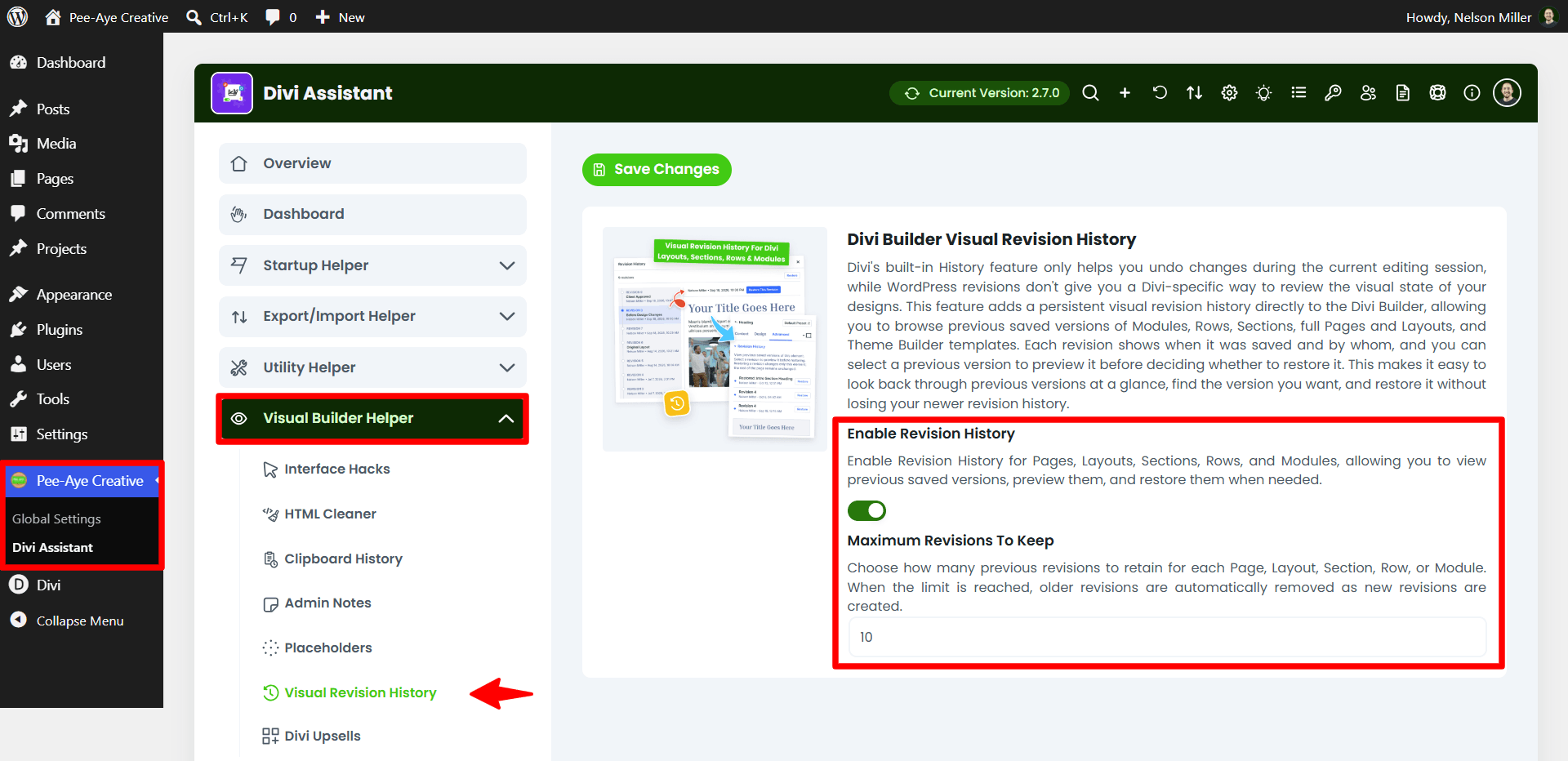
Go to the Pee-Aye Creative menu in your WordPress dashboard and select the Divi Assistant plugin. Locate the Visual Builder Helper tab on the left side and click the Visual Revision History subtab to enable the feature to start using it.

enable divi builder visual revision history in divi 5 using the divi assistant plugin created by pee aye creative

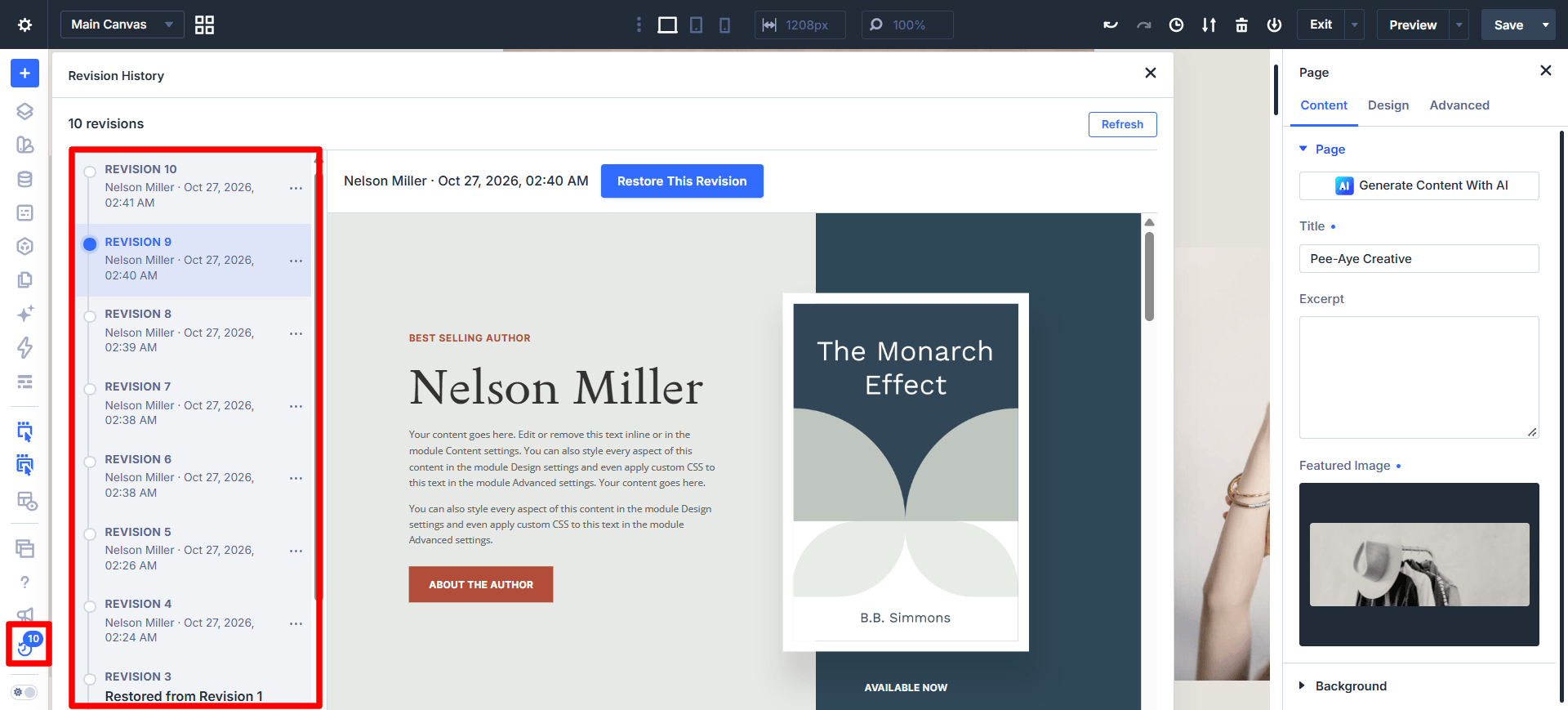
After enabling the feature, you will see a new option in the Divi Builder that allows you to access the Visual Revision History. Clicking on this option will display a list of previous versions for the selected element, where you can preview and choose which version to restore.

preview a previous layout revision in divi builder using the divi assistant plugin created by pee aye creative
element revision history with preview for a section, row, or module in divi builder using the divi assistant plugin created by pee aye creative
frequently asked questions

Frequently Asked Questions

How does Visual Revision History work?

Visual Revision History allows you to browse and preview saved versions of your Divi elements, showing details like author and date for each revision.

Can I restore a version without losing my current work?

Yes, you can restore a previous version while keeping your newer revisions intact, ensuring no work is lost.

Is it easy to identify important revisions?

Absolutely! You can add custom labels to revisions, making it easier to find and identify important versions later.

What types of Divi elements can I preview?

You can preview and restore previous versions of sections, rows, modules, and entire page layouts.

Do I need to enable this feature for each page?

No, once enabled in the Divi Assistant settings, Visual Revision History is available for all your Divi pages.
divi assistant plugin by pee aye creative

Get This Feature And More With The Divi Assistant Plugin

The ability to visually preview and restore previous versions of Divi elements is just one of the features offered. Divi Assistant provides a comprehensive set of tools that streamline your design process and enhance your control over your Divi projects.

Explore Our Other Divi Solutions

Shopping cart0
There are no products in the cart!
You may be interested in…
Divi Builder Experience Helper Plugin by Pee-Aye Creative
From: $29.00 / year

Select options This product has multiple variants. The options may be chosen on the product page

divi assistant plugin by pee aye creative
From: $69.00 / year

Select options This product has multiple variants. The options may be chosen on the product page

Divi Carousel Maker Plugin by Pee Aye Creative
From: $29.00 / year

Select options This product has multiple variants. The options may be chosen on the product page

Logo for D Beginner Course with graduation cap
From: $47.00 / year

Select options This product has multiple variants. The options may be chosen on the product page

divi events calendar
From: $54.00 / year

Select options This product has multiple variants. The options may be chosen on the product page

Continue shopping
0